Amazon Bullet Points Guide: Write Product Features That Sell

Your Amazon bullet points are the second most-read element after the title. In the 3-5 seconds most shoppers spend scanning a listing before deciding to read more or scroll away, bullet points carry heavy lifting: they highlight key benefits, answer top questions, and differentiate your product from competitors.
This comprehensive guide reveals proven strategies for writing bullet points that rank higher in search, capture attention on mobile, and convert browsers into buyers - from benefit-first structure and keyword placement to mobile optimization and A/B testing.
Generate Your Listing Copy Free →What Are Amazon Bullet Points?
Amazon bullet points are the 5 concise statements that appear directly beneath the product title and price on a detail page. Each bullet point is limited to 500 characters (though most top sellers use 150-250), and collectively they serve as a quick-scan summary of your product's most important attributes, benefits, and differentiators.
Unlike product descriptions, which allow paragraphs of narrative, bullet points demand brevity and precision. Each point must stand alone, deliver a complete idea, and contribute to the buyer's decision-making process. Amazon's algorithm reads bullet points for keyword indexing, and shoppers read them to confirm whether the product matches their needs.
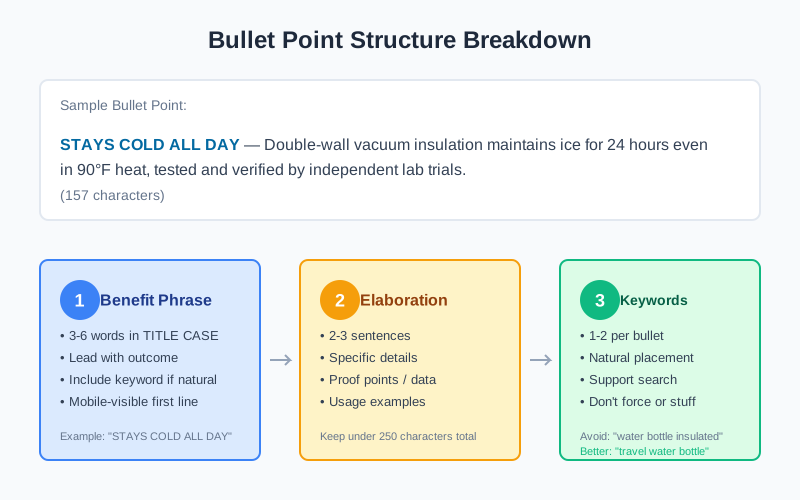
The best bullet points follow a consistent structure: start with a benefit or feature in uppercase, elaborate with specific details or proof, and end with a relevant keyword or use case. This pattern makes each point scannable on mobile, where 70% of Amazon shopping happens.
Why Bullet Points Matter
Bullet points influence three critical metrics: search visibility, click-through from search results, and conversion rate on the detail page.
Search visibility and keyword indexing
Amazon's A9 algorithm indexes bullet points for relevant search terms. While titles carry the most ranking weight, bullet points are the second-strongest signal for keyword relevance. Well-placed keywords in bullets can help you rank for secondary and long-tail terms that did not fit in your title.
For example, a water bottle listing might rank for "leak-proof water bottle" because the bullet points mention "leak-proof lid with silicone seal," even if the title does not contain that exact phrase. This secondary keyword coverage expands your reach without title keyword stuffing.
Click-through rate from search results
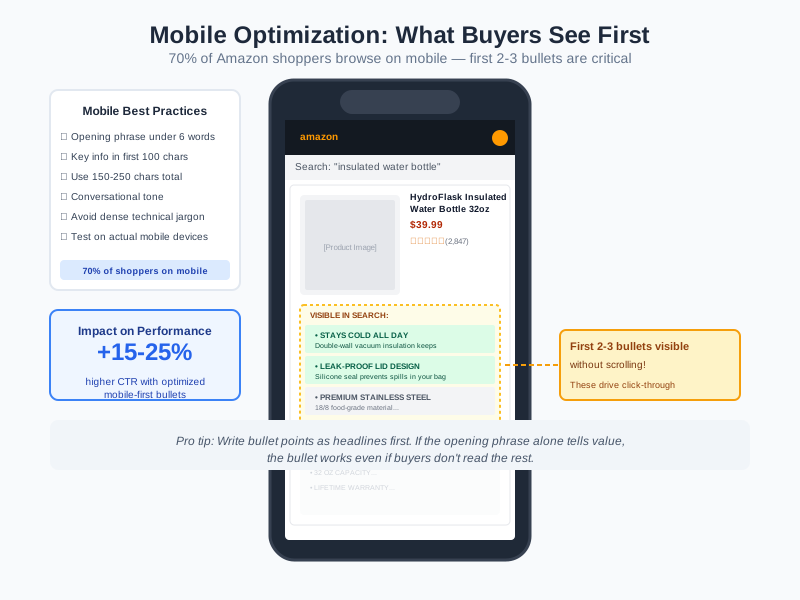
On Amazon mobile search, the first 2-3 bullet points often appear alongside the product image and title. These visible bullets function as a preview of your listing. If they highlight the right benefits and features, shoppers are more likely to click. If they are generic or confusing, shoppers scroll past.
Research from marketplace analytics tools shows that listings with benefit-first bullet points can achieve 15-25% higher click-through rates compared to feature-only bullets. The difference comes from answering the buyer's immediate question: "Is this the right product for me?"
Conversion rate and buyer confidence
Bullet points reduce purchase hesitation. A clear set of 5 points answers common questions about size, material, usage, and quality before the shopper needs to scroll to the full description or Q&A section. When buyers feel informed, they convert faster. When they feel uncertain, they either leave or delay the decision.
High-converting bullet points often share a pattern: they start with the outcome the buyer wants, then explain how the product delivers it. This benefit-first structure aligns with how people make decisions: they care about results first, product features second.
How to Write Amazon Bullet Points: 5 Steps
Writing effective bullet points is a systematic process. Follow these steps to craft points that support search, clicks, and conversions.
Identify your 5 key selling points
Before writing, list all possible features and benefits your product offers. Then prioritize based on three criteria: purchase decisiveness (what makes someone buy), competitive differentiation (what makes you stand out), and search demand (what terms people use). Narrow this list to 5 points.
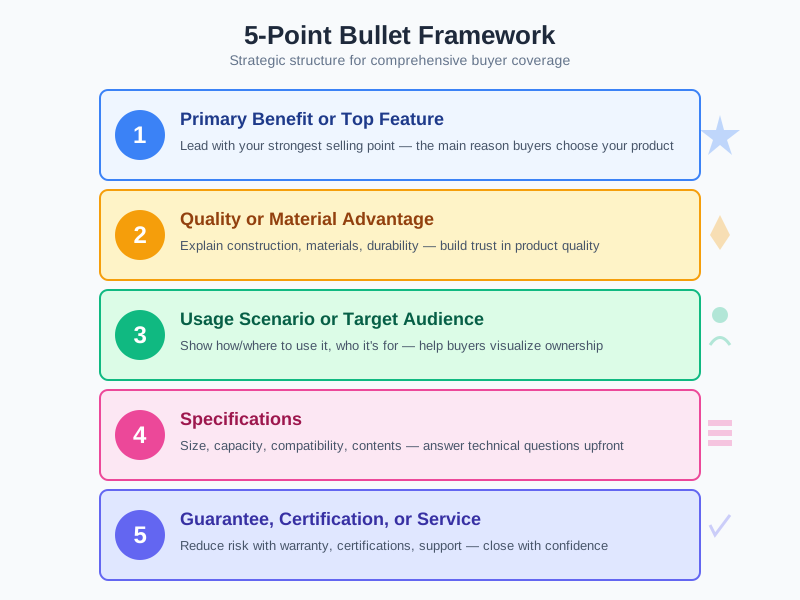
The typical structure for 5 bullet points:
- Primary benefit or top feature
- Quality or material advantage
- Usage scenario or target audience
- Specifications (size, capacity, compatibility)
- Guarantee, certification, or service
This structure ensures you cover the most important buyer questions without repetition.
Lead with a benefit, not a feature
Every bullet point should start with a short benefit or feature phrase in TITLE CASE. This opening phrase is what shoppers read first on mobile. It should be 3-6 words, clearly state what the buyer gains, and ideally include a relevant keyword.
Good opening phrases:
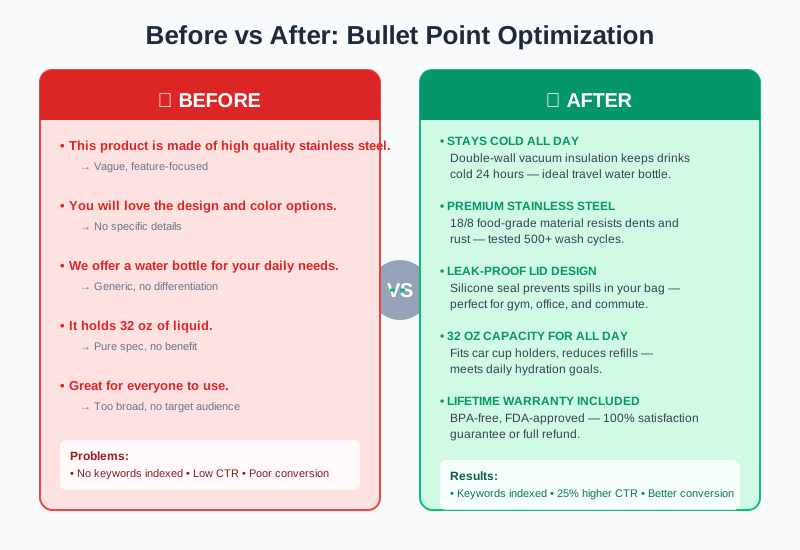
- ✓ LARGER CAPACITY FOR FEWER REFILLS
- ✓ BPA-FREE MATERIALS FOR SAFE DRINKING
- ✓ PRECISION FIT FOR SECURE HOLD
Weak opening phrases:
- ✗ This product is made of...
- ✗ You will love...
- ✗ We offer...
The benefit-first approach signals value immediately. Instead of saying "Made of stainless steel," say "PREMIUM STAINLESS STEEL FOR DURABILITY." The second version tells the buyer why the material matters.
Support with specific details
After the opening phrase, add 2-3 sentences that elaborate with concrete details, proof points, or usage examples. Specificity builds credibility. Vague claims create doubt.
Weak:
"High quality material that lasts long."
Strong:
"Constructed from 18/8 food-grade stainless steel that resists dents, drops, and daily wear. Tested to maintain temperature for 24 hours and withstand 500+ wash cycles without fading or warping."
The strong version answers how long it lasts, what tests prove it, and what conditions it handles. These details help buyers visualize the product in their lives.
Place keywords naturally
Bullet points support keyword indexing, but keyword placement must feel organic. The best practice is to include 1-2 keywords per bullet, positioned within the elaboration sentences rather than forced into the opening phrase.
Instead of:
"WATER BOTTLE INSULATED FOR COLD DRINKS"
Write:
"Double-wall vacuum insulation keeps drinks cold for 24 hours and hot for 12, making it ideal as a travel water bottle or office companion."
The keyword "travel water bottle" appears naturally in context. This reads well and still signals relevance to Amazon's algorithm.
Optimize for mobile scanning
Over 70% of Amazon shoppers browse on mobile devices, where screen width limits how much of each bullet point is visible without scrolling. Optimize for mobile by:
- •Keeping opening phrases under 6 words
- •Placing the most important information first
- •Using 150-250 characters per bullet (avoid the 500-character limit)
- •Writing in a conversational, not academic, tone
- •Avoiding dense blocks of technical jargon
A mobile-optimized bullet reads like a headline followed by a short explanation. If the first line alone tells the buyer something valuable, the bullet works even if they do not read the rest.
Put this into practice
Image Chat's free product description generator reads your product photo and produces platform-ready Amazon listing copy - including benefit-focused bullet points, SEO titles, and descriptions you can refine using the strategies in this guide.
Generate your listing copy free →Bullet Point Structure and Formulas
The most effective bullet points follow proven structures. Use these formulas as starting points.
Formula 1: Benefit + How + Proof
[BENEFIT] — [How it works] — [Proof or specification]
Example: "STAYS COLD ALL DAY — Double-wall vacuum insulation maintains ice for 24 hours even in 90°F heat, tested and verified by independent lab trials."
Formula 2: Feature + Advantage + Result
[FEATURE] — [Why it matters] — [Outcome for buyer]
Example: "WIDE MOUTH OPENING — Fits standard ice cubes and allows easy cleaning with a bottle brush, saving you time and effort on maintenance."
Formula 3: Problem + Solution + Specific
[PROBLEM IT SOLVES] — [Your solution] — [Specific detail]
Example: "NO MORE SPILLS IN YOUR BAG — Leak-proof lid with silicone seal prevents drips even when the bottle tips, tested through 10,000 inversion cycles."
These formulas help you structure thoughts into scannable, persuasive points. After drafting, revise for natural flow and keyword integration.
Best Practices
Write for scanners first, readers second
Most shoppers do not read bullet points word-for-word. They scan the opening phrases and stop when something catches their eye. Put the most important benefit first, and use the remaining 4 points to support it with features, specifications, and reassurance.
Maintain consistency across the set
All 5 bullet points should follow the same structure: TITLE CASE opening, elaboration sentences, and natural keyword integration. This consistency creates a professional, trustworthy appearance.
Align bullets with your title and images
If your title highlights "leak-proof" as a key feature, at least one bullet point should explain how the leak-proof design works. If your main image shows the product in use, one bullet should describe that use case. Misalignment creates buyer confusion.
Avoid forbidden terms and claims
Amazon prohibits promotional language in bullet points, including phrases like "best seller," "top rated," "free shipping," and subjective claims without proof. Review Amazon's product detail page rules before publishing.
Test and refine
Use Amazon's Manage Your Experiments tool (for Brand Registered sellers) to A/B test different bullet point sets. Monitor conversion rate and search term reports to see which version drives more sales and ranks for more keywords.
Common Mistakes
Writing feature lists instead of benefit statements
A feature describes what the product has. A benefit explains what the buyer gains. Feature: "32 oz capacity." Benefit: "32 OZ CAPACITY KEEPS YOU HYDRATED ALL DAY." Sellers who focus on features miss the chance to connect product attributes to buyer needs.
Keyword stuffing
Cramming multiple keywords into one bullet point makes it unreadable and can trigger Amazon suppression. Instead, distribute keywords across the 5 bullets and the backend search terms field. Let each bullet focus on one main idea with one supporting keyword.
Hiding the product type
Some sellers use creative names or branded terms without mentioning what the product actually is. A bullet should always include the core product term (water bottle, yoga mat, desk lamp) at least once, usually in the first or second bullet.
Repetition across bullets
If every bullet starts with "This water bottle..." or repeats "high quality" three times, the listing feels padded and unprofessional. Each bullet should contribute a unique point that adds new information.
Ignoring mobile readers
Long, dense bullets that require scrolling to read the key information perform poorly on mobile. Keep the opening benefit phrase visible without scrolling, and put critical details early in each bullet.
Frequently Asked Questions
How many bullet points should an Amazon listing have?
What is the character limit for Amazon bullet points?
Should I repeat keywords from the title in bullet points?
Can I include promotional language in bullet points?
How do I decide which 5 points to include?
Should bullet points be the same across product variations?
How often should I update bullet points?
Can I use special characters or emojis in bullet points?
Need Better Bullet Points Fast?
Use Image Chat to turn your product photo into benefit-focused bullet points, SEO titles, and descriptions tailored to what you actually sell. Upload an image, get structured listing copy, then refine using the formulas and strategies in this guide.
Generate Your Listing Copy Free →