Amazon Title Optimization Guide: The Complete Playbook for Higher Rankings and More Sales

Your Amazon product title is the single most important on-page factor for both search visibility and conversion rates. In a marketplace with over 12 million products, a well-optimized title can mean the difference between appearing on page one or being buried in search obscurity.
This comprehensive guide reveals the exact strategies top sellers use to craft titles that rank higher, attract more clicks, and drive more sales - from keyword research and title structure to Amazon's style rules and continuous testing.
Generate Your Listing Copy Free →What Is Amazon Title Optimization?
Amazon title optimization is the strategic process of crafting product titles that maximize both search visibility and click-through rates. It involves carefully selecting and positioning keywords, formatting for readability, and aligning with Amazon's algorithm preferences - specifically the A9 algorithm that powers Amazon's search engine.
Unlike traditional SEO for Google, Amazon title optimization has a dual objective: you must satisfy the algorithm's relevance requirements while simultaneously persuading human shoppers to click. Every character counts. Amazon limits titles to 200 characters for most categories (some have stricter limits), making precision essential.
Key components of title optimization
Keyword research
Identifying high-intent search terms your target customers use.
Keyword placement
Strategically positioning keywords where they have maximum impact.
Readability formatting
Using capitalization, punctuation, and structure for clarity.
Brand positioning
Building brand recognition while maintaining search relevance.
Feature highlighting
Showcasing key product attributes that drive purchase decisions.
When done correctly, title optimization can dramatically improve your product's search ranking, increase organic traffic, and boost conversion rates - all without additional advertising spend.
Why Title Optimization Matters
Understanding the "why" behind title optimization transforms it from a tedious task into a strategic advantage. Here's what's at stake:
Search visibility and organic traffic
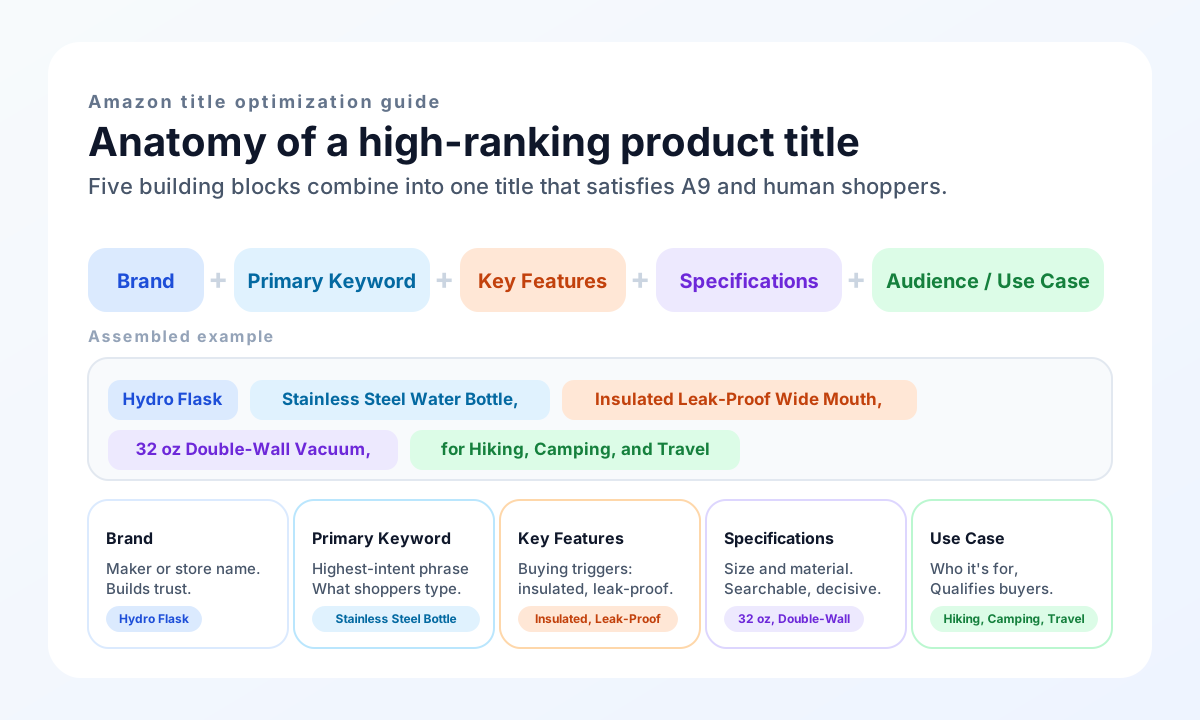
Amazon's A9 algorithm weighs the product title more heavily than almost any other listing element. Keywords in your title carry significantly more ranking power than keywords in your bullet points or description. Studies show that products with optimized titles rank 30-50% higher for their primary keywords compared to under-optimized competitors.
Consider this: 70% of Amazon shoppers never click past the first page of search results. If your product isn't there, you're invisible to the vast majority of potential customers. Title optimization is your primary tool for breaking into those coveted top positions.
Click-through rate impact
Even if your product appears in search results, you need shoppers to actually click on it. Your title is the most prominent element in search listings - it's what shoppers see first and read most carefully. A compelling, relevant title can improve click-through rates by 20-40% compared to generic, keyword-stuffed alternatives.
The math is simple: more clicks mean more traffic, which leads to more sales. Higher sales velocity further improves your search ranking, creating a positive feedback loop that compounds your results over time.
Conversion rate influence
Shoppers who click on a relevant, well-crafted title are pre-qualified - they already know the product matches their needs. This alignment between title and product reality reduces bounce rates and improves conversion rates by 15-25%. Conversely, misleading or vague titles attract the wrong shoppers, leading to disappointed visitors who quickly leave without purchasing.
Competitive differentiation
In saturated categories, titles often become the deciding factor between similar products. A title that clearly communicates unique selling propositions (USPs) - such as "BPA-Free," "Lifetime Warranty," or "Award-Winning Design" - helps your product stand out from competitors who bury these differentiators in bullet points or descriptions.
Put this into practice
Image Chat's free product description generator reads your product photo and produces platform-ready Amazon listing copy - including SEO titles, bullets, and descriptions you can optimize using the structure in this guide.
Generate your listing copy free →How to Optimize Amazon Titles: 6 Steps
Title optimization is both an art and a science. Follow this systematic approach to create titles that perform.
Conduct comprehensive keyword research
Begin with deep keyword research using tools like Amazon's Brand Analytics, Helium 10, Jungle Scout, or Sellerboard. Your goal is to identify:
- •Primary keyword - the highest-volume, most relevant search term for your product (e.g., "stainless steel water bottle").
- •Secondary keywords - related terms with significant search volume (e.g., "insulated water bottle," "reusable water bottle").
- •Long-tail keywords - specific, lower-competition phrases (e.g., "32 oz stainless steel water bottle with straw").
- •Competitor keywords - terms competitors rank for that you're missing.
Prioritize keywords based on search volume, relevance to your specific product, competition level, and purchase intent (transactional vs. informational searches).
Pro tip: Use Amazon's autocomplete feature by typing your primary keyword in the search bar and noting suggested completions. These represent real searches by real shoppers.
Structure your title for maximum impact
Amazon titles follow a general formula that balances algorithm preferences with shopper readability:
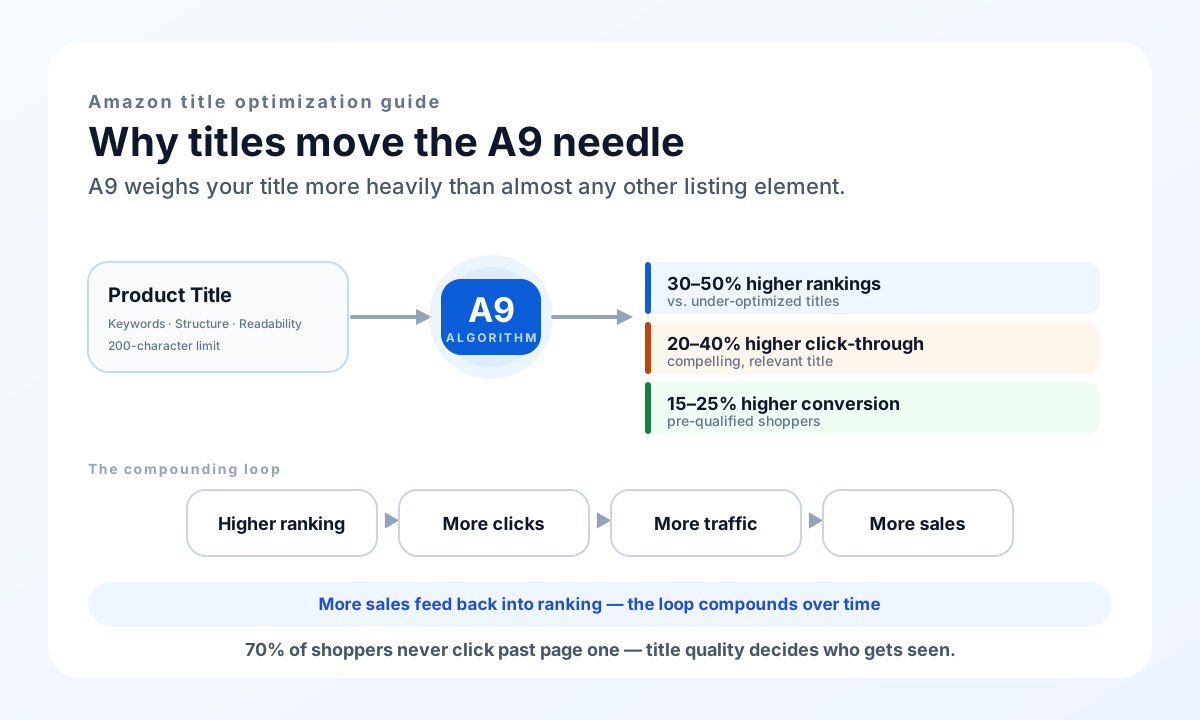
[Brand] + [Primary Keyword] + [Key Features] + [Specifications] + [Target Audience/Use Case]
Example breakdown:
- Brand: Hydro Flask
- Primary Keyword: Stainless Steel Water Bottle
- Key Features: Insulated, Leak-Proof, Wide Mouth
- Specifications: 32 oz, Double-Wall Vacuum
- Target Audience/Use Case: for Hiking, Camping, Travel
Complete title: "Hydro Flask Stainless Steel Water Bottle, Insulated Leak-Proof Wide Mouth, 32 oz Double-Wall Vacuum, for Hiking, Camping, and Travel"
This structure ensures your most important keywords appear early, where they have the greatest ranking impact, while still providing complete information that helps shoppers make purchase decisions.
Optimize keyword placement
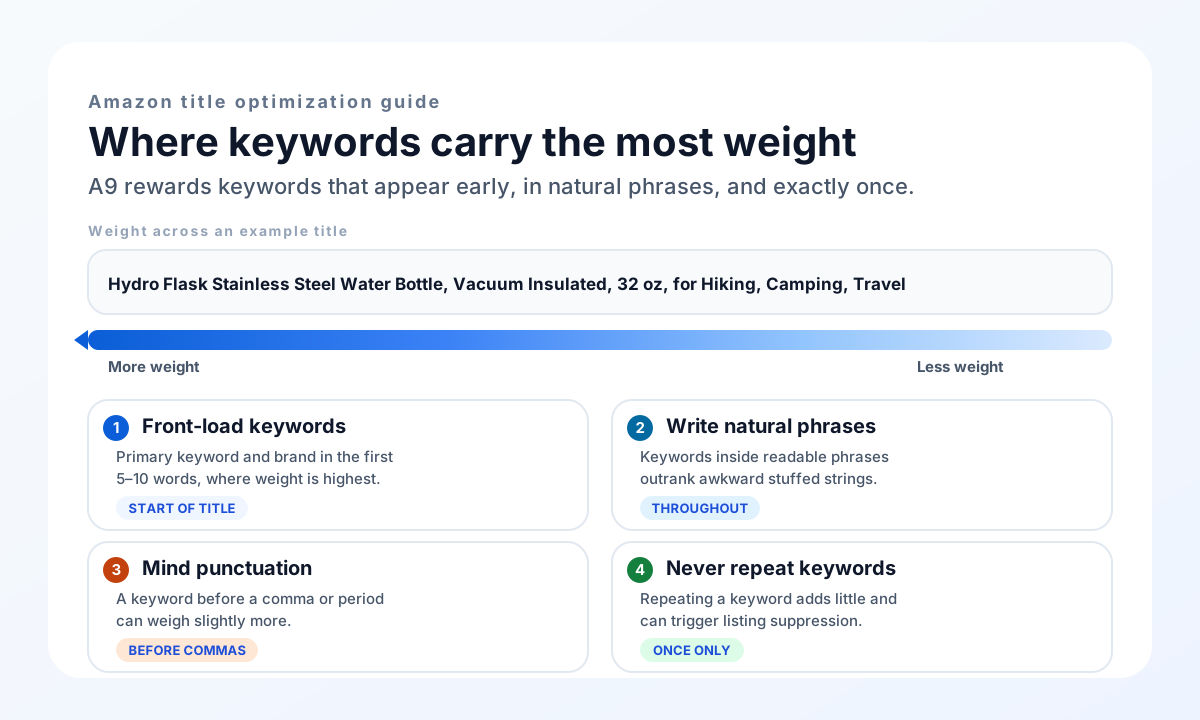
Not all title positions are created equal. The A9 algorithm gives more weight to keywords that appear:
- At the beginning of the title - place your primary keyword (and brand name, if it contains keywords) in the first 5-10 words.
- In natural phrases - keywords integrated into readable phrases rank better than awkward keyword stuffing.
- Before punctuation - keywords before commas or periods may carry slightly more weight.
- Without repetition - repeating the same keyword multiple times provides diminishing returns and can trigger suppression.
Critical rule: Never sacrifice readability for keyword density. A title that ranks well but confuses shoppers will have poor click-through and conversion rates, ultimately hurting your overall ranking.
Incorporate key features and specifications
Include product-specific details that shoppers actively search for:
These specifics serve dual purposes: they're searchable keywords that help shoppers find your product, and they're decision-making criteria that help qualified buyers convert.
Follow Amazon's style guidelines
Amazon enforces title formatting rules across all categories. Violations can result in suppressed listings or account penalties:
Do:
- ✓ Capitalize the first letter of each word (except prepositions, conjunctions, and articles)
- ✓ Use numerals for numbers (write "5 Pack" not "Five Pack")
- ✓ Separate phrases with commas or hyphens
- ✓ Use standard spelling (no "lite" for "light")
- ✓ Keep titles under 200 characters (check your category limit)
Don't:
- ✗ Use ALL CAPS for emphasis
- ✗ Include promotional phrases ("Best Seller," "Hot Item," "Free Shipping")
- ✗ Add seller information or URLs
- ✗ Use symbols or special characters (!, @, #, $, etc.)
- ✗ Repeat words excessively or use subjective claims
Test and iterate
Title optimization isn't a one-time task. Continuously monitor performance and refine:
- •Track keyword rankings weekly using tools like Helium 10 or Brand Analytics.
- •Monitor click-through rates in Amazon Advertising reports.
- •A/B test different title variations using Amazon's Manage Your Experiments tool (for Brand Registered sellers).
- •Update titles seasonally or when launching new product variations.
Put the process to work with Image Chat
The fastest way to get a first draft is to start from your product image. Upload a photo to Image Chat's free product description generator and it returns an SEO title, bullets, and description tailored to the product you actually sell - then apply the structure and rules from this guide. The tool is free, needs no sign-up, and works for Amazon, Shopify, and Etsy.
Try the generator free →Amazon Title Best Practices
Implement these proven strategies to maximize your title optimization results.
Lead with your strongest keywords
Your title's first 50-80 characters are visible in most search results and mobile displays. Front-load your primary keyword and most compelling differentiators.
Balance keyword coverage with readability
Aim for 5-8 unique keywords per title. Focus on quality over quantity - a few well-placed, high-intent keywords outperform a kitchen-sink approach.
Include model numbers and variations
For products with multiple variants (colors, sizes, patterns), include model numbers or clear identifiers. This helps shoppers find the exact variation they want.
Align title with backend keywords
Don't duplicate keywords between title and backend. Use backend search terms for synonyms, alternate spellings, and complementary terms that didn't fit naturally in your title.
Study top-performing competitors
Analyze titles of products ranking in the top 10 for your target keywords. Identify patterns in structure, keyword selection, and feature highlighting - then differentiate.
Consider mobile optimization
Over 50% of Amazon shoppers browse on mobile devices. Ensure your most critical information appears within the first 50 characters, typically visible before truncation.
Common Mistakes to Avoid
Even experienced sellers make title optimization errors. Steer clear of these pitfalls:
Keyword stuffing
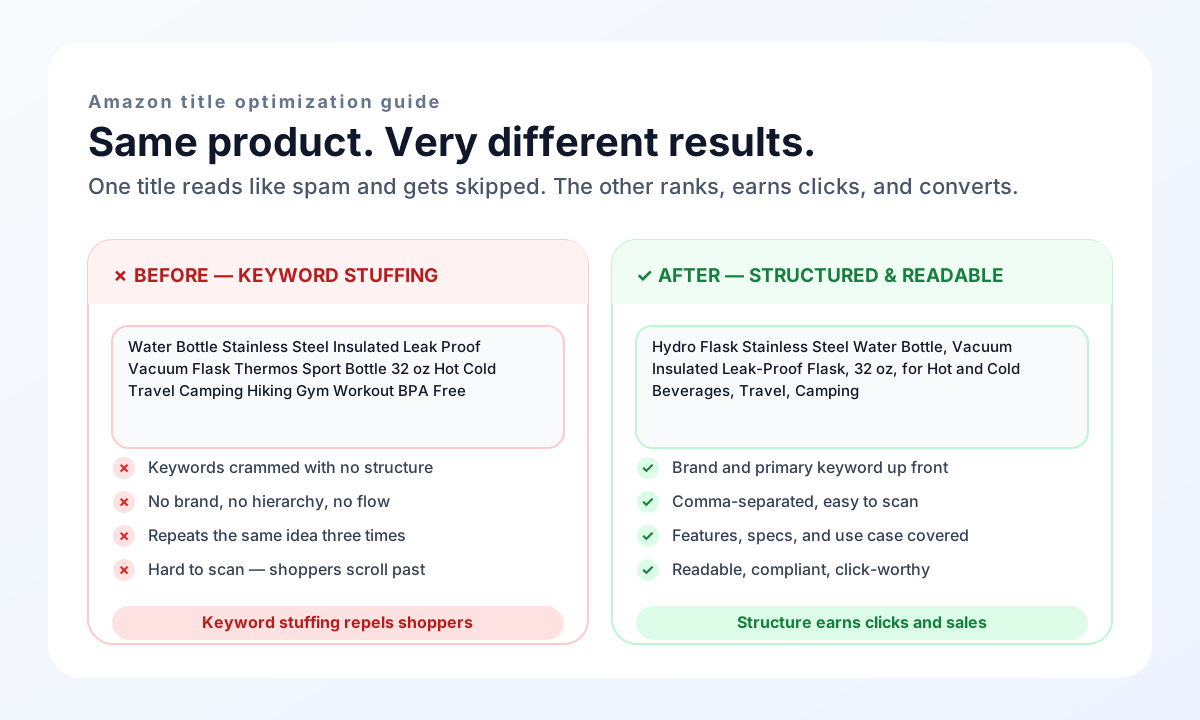
Cramming as many keywords as possible into your title backfires. It violates Amazon's guidelines, creates unreadable titles that repel shoppers, and can trigger algorithmic suppression.
Bad: "Water Bottle Stainless Steel Insulated Leak Proof Vacuum Flask Thermos Sport Bottle 32 oz Hot Cold Travel Camping Hiking Gym Workout BPA Free"
Good: "Hydro Flask Stainless Steel Water Bottle, Vacuum Insulated Leak-Proof Flask, 32 oz, for Hot and Cold Beverages, Travel, Camping"
Using promotional language
Amazon explicitly prohibits promotional phrases in titles. Words like "Best Seller," "New Arrival," "Limited Time," or "On Sale" can result in listing suppression. Save promotional messaging for your advertising campaigns and store pages.
Ignoring category-specific rules
Different Amazon categories have different title requirements. Electronics categories often require brand names at the beginning. Clothing categories may require size and color information. Research your category's specific guidelines before optimizing.
Copying competitor titles verbatim
While competitor research is valuable, copying titles directly is both unethical and ineffective. Your product has unique features and selling points that deserve original treatment. Plus, identical titles dilute search relevance for both listings.
Neglecting updates
Market conditions change. New competitors enter. Keyword search volumes shift. Customer preferences evolve. A title that performed well six months ago may need refreshing. Schedule quarterly title reviews to ensure ongoing optimization.
Focusing only on ranking
A #1 ranking means nothing if shoppers don't click. Balance keyword optimization with compelling, benefit-driven language that motivates clicks. Your title should rank well AND convert well - these goals are complementary, not conflicting.
Frequently Asked Questions
How long should an Amazon product title be?
Most Amazon categories allow up to 200 characters for product titles, but some categories have stricter limits (as low as 50-80 characters). Always check your specific category requirements. Generally, aim for 150-180 characters - long enough to include all essential information, but not so long that Amazon truncates your title in search results.
Should I put my brand name at the beginning of the title?
For most categories, yes - Amazon recommends leading with your brand name. This builds brand recognition, helps protect against unauthorized sellers, and is required for some categories (particularly electronics and apparel). However, if your brand name does not contain relevant keywords, consider placing it after your primary keyword if your category guidelines allow.
Can I use commas and other punctuation in Amazon titles?
Yes, commas are the preferred way to separate phrases in Amazon titles. They improve readability without counting against your character limit. Avoid other punctuation marks like exclamation points, question marks, or special symbols (@, #, $), which violate Amazon style guidelines.
How many keywords should I include in my title?
Aim for 5-8 unique keywords per title. Focus on your primary keyword plus 4-7 secondary keywords that fit naturally within the context. Avoid keyword repetition - using the same word multiple times provides minimal benefit and can make your title unreadable.
Should I repeat keywords from my title in bullet points?
It is natural and beneficial for your most important keywords to appear in both your title and bullet points, as these reinforce relevance. However, do not engage in deliberate keyword repetition (saying "water bottle water bottle" multiple times). Instead, use variations and related terms to provide comprehensive coverage.
What's the difference between a primary and secondary keyword?
Your primary keyword is the highest-volume, most relevant search term for your product - it is what your ideal customer would type first when searching. Secondary keywords are related terms with meaningful search volume that capture different search behaviors. For example, "stainless steel water bottle" might be primary, while "insulated water bottle" and "reusable water bottle" are secondary.
Can I change my title after my product is live?
Yes, you can and should update your title as you gather performance data and market insights. However, make changes thoughtfully - dramatic title changes can temporarily affect your search ranking as the algorithm re-indexes your listing. A/B test changes using Amazon's experiments tool when possible, and monitor rankings closely after any updates.
How do I find the right keywords for my Amazon title?
Use Amazon-specific keyword research tools like Brand Analytics (free for registered brands), Helium 10, Jungle Scout, or Keyword Tool. Start with your primary product category and use autocomplete suggestions, competitor analysis, and search volume data to build a comprehensive keyword list. Prioritize keywords with high search volume, strong relevance, and purchase intent.
Ready to Optimize Your Amazon Listings?
Your product title is your most powerful on-page optimization tool. By implementing the strategies in this guide - strategic keyword research, proven title structures, and continuous testing - you can dramatically improve your search visibility, attract more qualified shoppers, and increase your sales.