What Is a Shopify Product Description Template?
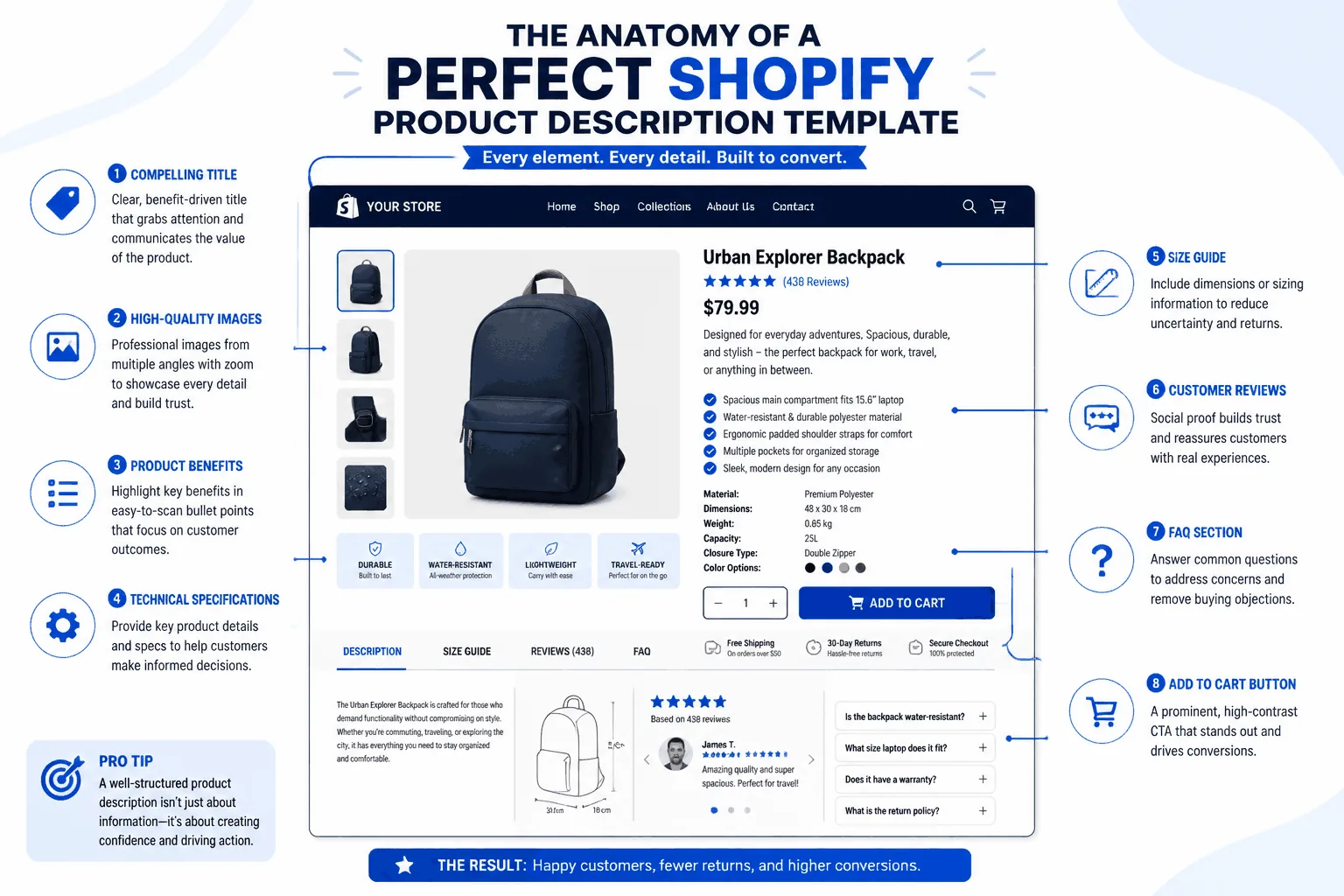
A Shopify product description template is a repeatable framework for writing product page copy. It is not a paragraph you paste onto every listing. Instead, it gives you prompts, sections, and formatting rules so each description covers what shoppers need: what the product is, who it is for, why it matters, and which details remove hesitation.
A useful template typically includes:
- A short opening that identifies the product
- A benefit-led paragraph that explains why it matters
- A scannable list of features or specifications
- Trust-building details such as materials, sizing, care, or compatibility
- A clear call to action that supports the purchase decision
The goal is consistency, not sameness. When product pages follow a familiar logic, shoppers know where to find information and your team spends less time rebuilding structure for every SKU.
Why Use Product Description Templates?
Templates reduce friction for both the writer and the buyer. Without a framework, one listing may focus only on specifications, another may bury the product in storytelling, and a third may say almost nothing. That inconsistency makes a store harder to trust and harder to maintain.
Faster production
Start from proven prompts instead of a blank page when launching or refreshing a collection.
Better readability
Separate the main message from supporting details so shoppers can scan on mobile.
Natural SEO
A complete structure creates room for relevant language without keyword stuffing.
More confidence
Answer the questions that cause hesitation: what, who, how, and why.
Templates also make collaboration easier. Marketing, merchandising, and freelance writers can work from the same structure while preserving each product's voice. For broader store discoverability, pair this guide with our Shopify SEO Guide.
Try Shopify Description Template →
How to Create a Shopify Product Description Template
The best template starts with buyer questions, not adjectives. Build each section to remove uncertainty and make the next step feel obvious.
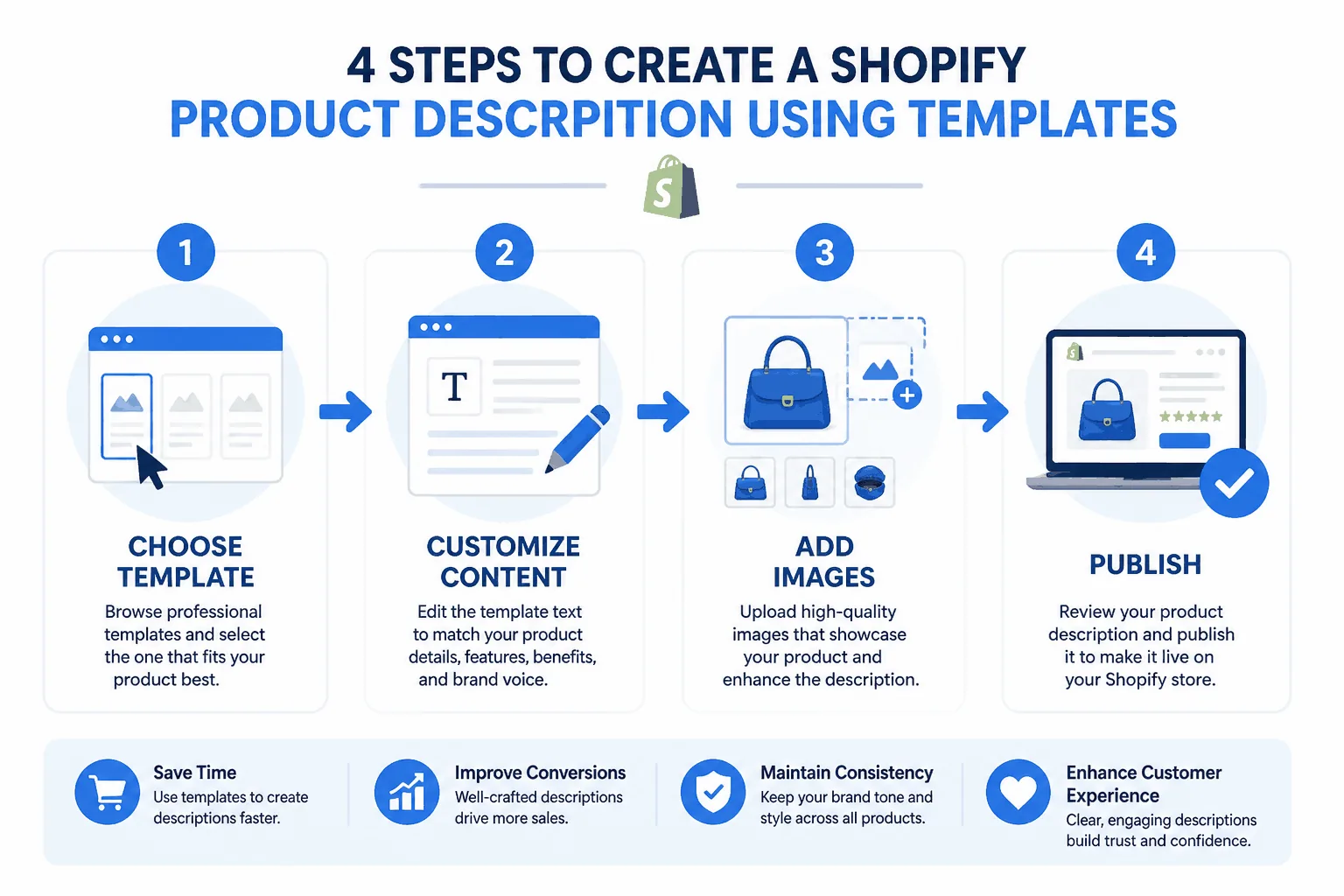
Step 1: Start with product identity
Open with one or two sentences that state what the product is, who it is for, and the main use case. A useful formula is: [Product name] is a [product type] designed for [audience/use case]. It helps [primary benefit] while supporting [secondary benefit].
Step 2: Turn features into benefits
Facts such as material, dimensions, or capacity matter, but buyers care about outcomes. Translate each feature into a practical benefit and add proof where possible. For example, replace “Made from organic cotton” with “Made from organic cotton for a softer feel against the skin and more breathable everyday wear.”
Step 3: Add scannable product details
Follow the benefit paragraph with a short bulleted block. Keep it plain and specific so shoppers can compare products quickly.
Details worth including
- ✓ Materials
- ✓ Size or dimensions
- ✓ Compatibility
- ✓ Care instructions
- ✓ Package contents
- ✓ Fit notes
- ✓ Shipping or usage notes when relevant
Step 4: Add category-specific prompts
Use a base structure for every SKU, then add prompts for the category. This keeps your catalog consistent without making every description sound identical.
Apparel
- • Fit and fabric feel
- • Care instructions
- • Occasion or styling use
Home goods
- • Materials and dimensions
- • Assembly or maintenance
- • Room or lifestyle context
Beauty and wellness
- • Skin or hair type
- • Texture and routine placement
- • Caution or ingredient notes
Electronics and accessories
- • Compatibility and setup
- • Battery or power details
- • Durability notes
Step 5: Optimize for search without forcing keywords
Use the language shoppers actually use. Place the primary product phrase naturally in the opening and use secondary modifiers only when they improve clarity. Avoid repeating the same phrase in every sentence or using the educational keyword “product description template” on an unrelated product page.
Step 6: Test and refine over time
Review performance after applying the template across a batch of products. Look at add-to-cart rate, conversion rate, organic landing pages, Search Console impressions, and time on page. If copy is read but does not convert, strengthen the value proposition. If shoppers bounce quickly, make the opening clearer or reduce dense blocks of text.
Copy-and-Adapt Shopify Product Description Template
Short intro
[Product name] is a [product type] for [audience] who need [main use case]. Designed to [primary benefit], it helps with [secondary benefit].
Benefits paragraph
Built with [material/feature], this product helps you [result]. Whether you use it for [context 1] or [context 2], it is designed to make [desired outcome] easier, more comfortable, or more reliable.
Key details
• Material: [material]
• Size / dimensions: [size]
• Best for: [use case]
• Includes: [what is included]
• Care / compatibility: [important note]
Closing CTA
Add [product name] to your routine or cart if you want [clear outcome].
Shopify Template Examples
The same framework can adapt to different categories. Lead with the use case, connect a feature to an outcome, and finish with details that reduce uncertainty.
Apparel
“The Everyday Linen Shirt is a lightweight button-up designed for warm-weather wear and easy layering. Made from breathable linen, it helps you stay comfortable through workdays, travel, or weekend outings.”
Home goods
“This ceramic pour-over coffee dripper is made for home brewers who want a cleaner, more controlled cup. Its heat-retaining body supports stable brewing while the compact shape fits easily into a daily kitchen routine.”
Beauty
“This fragrance-free daily moisturizer is designed for sensitive skin that needs hydration without heaviness. The lightweight cream absorbs quickly and supports a softer, more comfortable skin feel throughout the day.”
Best Practices and Common Mistakes to Avoid
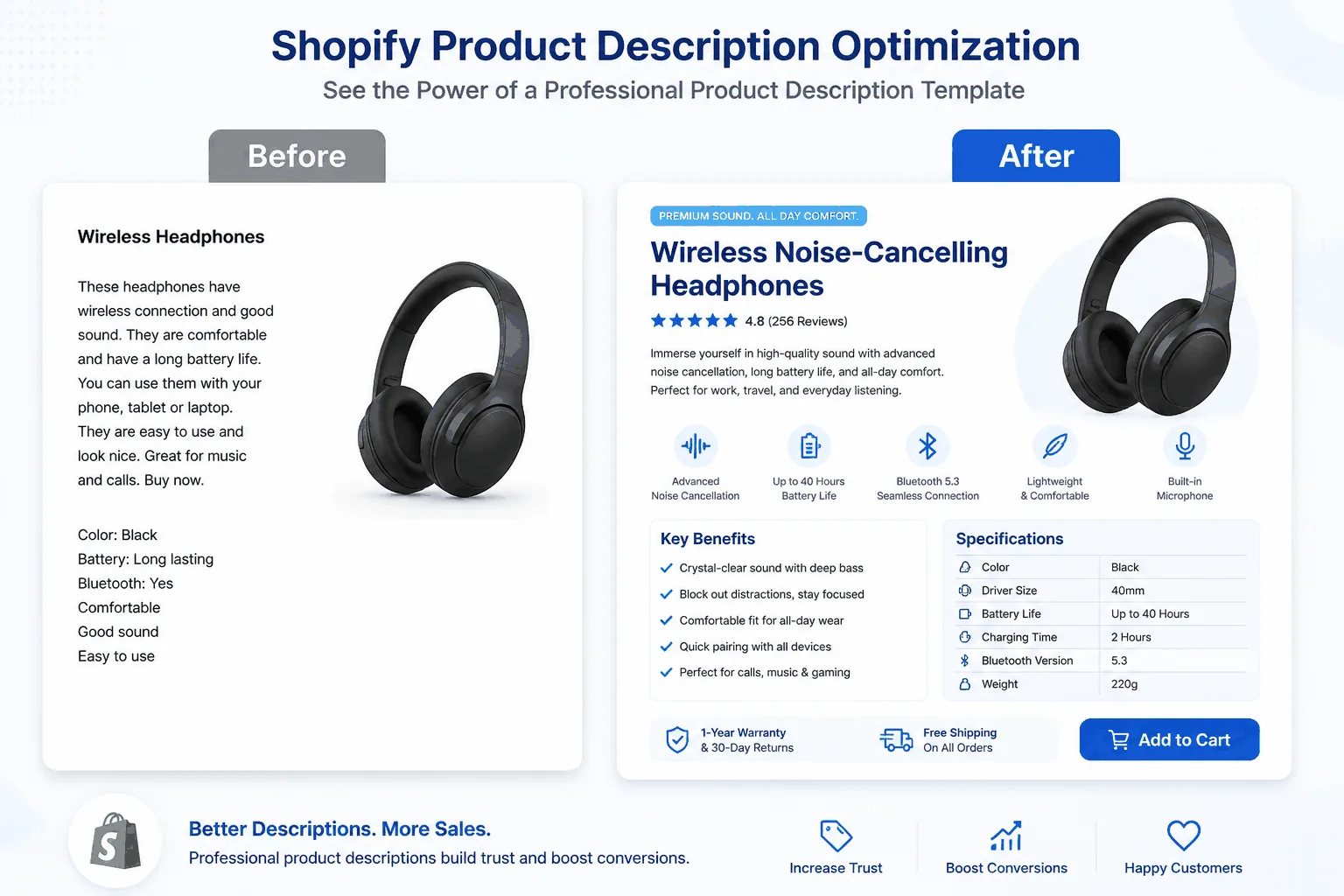
The strongest product descriptions feel clear, specific, and easy to scan. They do not try to sound impressive; they answer the buyer's next question before it becomes doubt.
Do
- ✓ Lead with clarity
- ✓ Turn attributes into benefits
- ✓ Use short paragraphs and bullets
- ✓ Support claims with real details
- ✓ Keep tone consistent
Avoid
- × Generic copy for every product
- × Keyword stuffing
- × Walls of text
- × Unsupported “best” or “perfect” claims
- × Reusing manufacturer copy
A description works best when it supports the whole product page, including the title, images, reviews, and structured product information. For a faster first draft, explore our AI Product Descriptions Guide and then edit the output for accuracy and brand voice.
Frequently Asked Questions
What should a Shopify product description template include?
At minimum, include a short product summary, a benefit-focused paragraph, scannable key details, and a simple call to action. Adjust the prompts by category while keeping the core structure consistent.
How long should a Shopify product description be?
There is no perfect word count for every product. Start with about 100 to 250 words for simpler products and write more when shoppers need additional specifications, sizing, or usage details.
Can I use the same template for every Shopify product?
Use the same core structure, but do not reuse identical copy. Keep the framework consistent while changing the wording, benefits, proof points, and detail prompts for each product.
Are product description templates good for SEO?
Yes, when they help you create clearer, more complete, and more consistent product pages. They hurt SEO when they produce duplicate copy or force awkward keyword repetition.
Should I focus on features or benefits?
Use both, but lead with benefits. Features explain what a product has; benefits explain why those features matter to the customer.
Can AI help create Shopify product descriptions from a template?
Yes. AI can speed up drafting from product images, specifications, and audience context. Review every draft for accuracy, tone, claims, and product-specific detail before publishing.
How often should I update product descriptions?
Review descriptions when you launch a collection, refresh your branding, notice weak conversion, or find search queries your pages do not answer. Product descriptions are living assets.