Shopify SEO Guide: Complete Optimization Strategies for 2026
Running a Shopify store is just the beginning. To truly succeed, you need customers to find you. This comprehensive guide reveals proven Shopify SEO strategies that help your store rank higher in search results, drive organic traffic, and increase sales without relying solely on paid advertising.
What is Shopify SEO?
Shopify SEO refers to the process of optimizing your Shopify store to improve its visibility in search engine results pages (SERPs). Unlike traditional website SEO, Shopify SEO focuses specifically on the unique architecture and features of the Shopify platform, including product pages, collections, and the built-in blogging system.
The key difference between Shopify SEO and traditional SEO lies in platform constraints and opportunities. While traditional websites offer complete control over technical elements, Shopify stores operate within a hosted environment with specific limitations. However, Shopify also provides built-in SEO-friendly features such as automatic sitemap generation, SSL certificates, and clean URL structures that can accelerate your optimization efforts.
Understanding these platform-specific nuances is essential. Shopify requires a tailored SEO strategy that leverages its strengths (like automatic structured data for products) while addressing its limitations (such as limited access to server-side configurations). This guide shows you exactly how to navigate both.
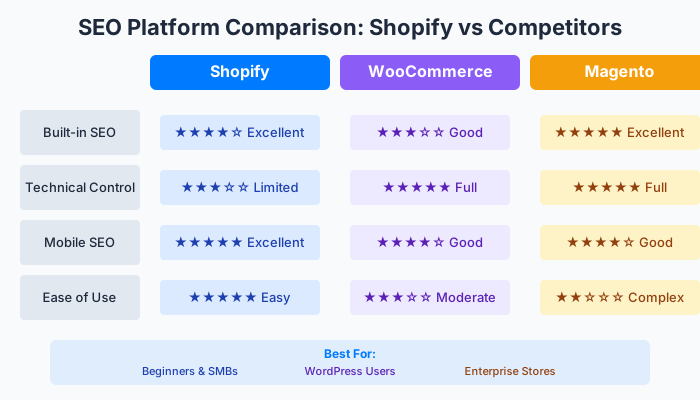
SEO comparison: Shopify vs WooCommerce vs Magento
Why Shopify SEO Matters
The Value of Organic Traffic
Organic traffic represents visitors who find your store through unpaid search results. Unlike paid advertising, which stops delivering traffic the moment you stop paying, organic traffic continues to grow over time with consistent SEO efforts. According to recent e-commerce research, organic search accounts for approximately 35% of website traffic for successful online stores, making it one of the most valuable acquisition channels.
Consider this comparison: a paid ad campaign might cost $2-5 per click, meaning 1,000 monthly visitors could cost $2,000-5,000. In contrast, once your SEO efforts establish strong rankings, those same 1,000 monthly visitors arrive at zero marginal cost. Over 12 months, this translates to potential savings of $24,000-60,000.
Cost-Benefit Analysis
SEO requires upfront investment in content creation, technical optimization, and link building. However, the long-term return on investment (ROI) significantly outperforms paid advertising. Studies show that SEO delivers an average ROI of 275% over three years, compared to 130% for Google Ads during the same period.
The key advantage is compounding returns. As your content ranks for more keywords and your domain authority increases, each new piece of content becomes easier to rank, creating a flywheel effect that accelerates growth.
Conversion Rate Performance
Organic traffic typically converts at higher rates than paid traffic. Research indicates that organic search visitors convert at approximately 16% compared to 9.6% for paid search visitors. This difference stems from intent: users clicking organic results often conduct more research and have higher purchase intent than those responding to advertisements.
How Image Chat Helps with Shopify SEO
Image Chat provides AI-powered tools that streamline your Shopify SEO workflow. Our platform helps you generate optimized product descriptions, create SEO-friendly meta tags, and analyze competitor strategies. By leveraging AI assistance, you can produce high-quality, keyword-optimized content at scale, freeing time to focus on strategic SEO decisions.
Try our AI Product Description Generator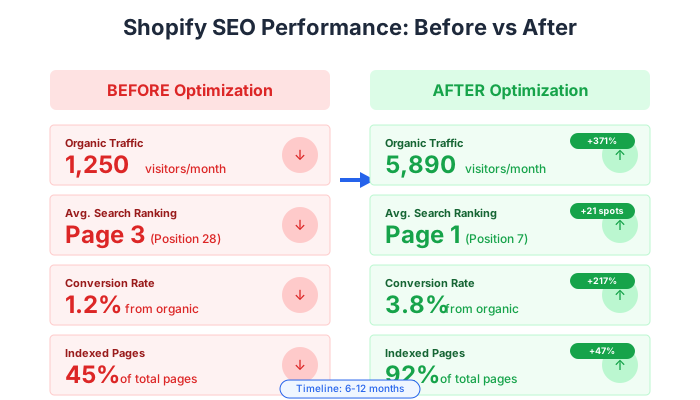
Real results: Shopify SEO performance before and after optimization
How to Do Shopify SEO
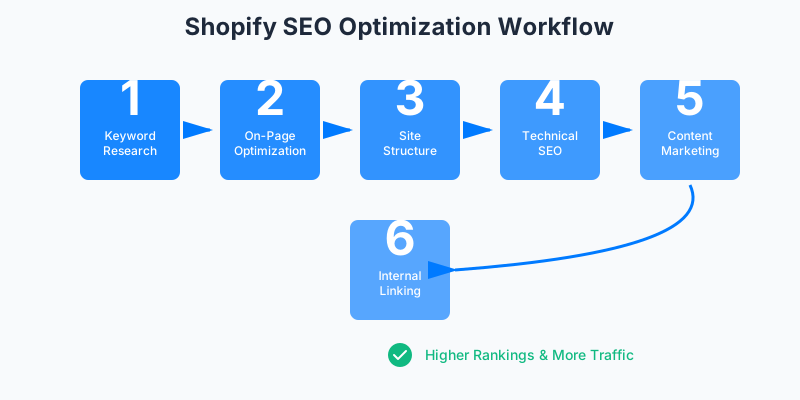
Complete Shopify SEO workflow from research to results
Step 1: Keyword Research
Keyword research forms the foundation of your Shopify SEO strategy. Start by identifying three types of keywords:
These are terms users search when looking for specific products. For example, "organic cotton t-shirt" or "wireless bluetooth headphones." Use tools like Google Keyword Planner, Ahrefs, or SEMrush to find product-specific keywords with reasonable search volume and manageable competition.
These broader terms describe product categories rather than specific items. Examples include "men's clothing," "kitchen appliances," or "beauty products." Optimize your collection pages for these keywords to capture users in the consideration phase.
Informational keywords attract users researching topics related to your products. "How to choose running shoes" or "sustainable fashion guide" are examples. These keywords typically have higher search volume but lower purchase intent, making them excellent for building brand awareness and authority.
Focus on long-tail keywords initially. While they have lower search volume, they face less competition and often convert better. For instance, "handmade leather wallet for men" might have 500 monthly searches but much higher purchase intent than "wallet" with 100,000 searches.
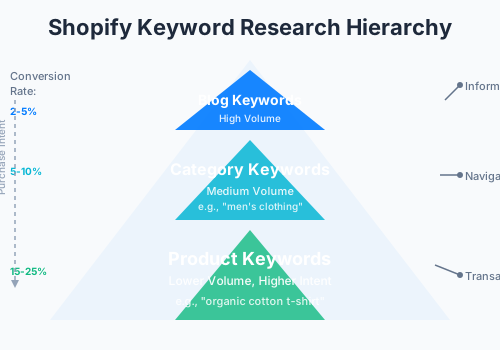
Keyword research hierarchy: from informational to transactional
Step 2: On-Page Optimization
Title Tags
Each page needs a unique, descriptive title tag containing your target keyword. Keep titles under 60 characters to ensure they display fully in search results. For product pages, use the format: "Product Name | Brand Name."For collection pages: "Collection Name - Category Keywords | Brand Name."
Meta Descriptions
Write compelling meta descriptions under 160 characters that include your target keyword and a clear call-to-action. Think of meta descriptions as ad copy—they influence click-through rates even though they don't directly affect rankings.
URL Structure
Shopify automatically generates URLs based on page titles, but you can customize them. Create clean, descriptive URLs that include your target keyword. For example:yourstore.com/products/organic-cotton-t-shirtis better than yourstore.com/products/product-12345.
Header Tags
Use H1 for your main page title (usually the product name on product pages), H2 for major sections, and H3 for subsections. This hierarchical structure helps search engines understand your content organization.
Step 3: Site Structure Optimization
A well-organized site structure helps both users and search engines navigate your store. Aim for a flat architecture where every page is accessible within 3-4 clicks from the homepage.
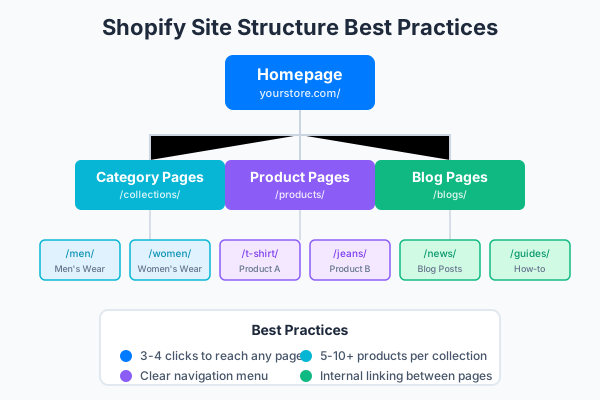
Ideal Shopify site structure for SEO
Create logical product collections that reflect how customers search. Avoid overly specific collections with only 1-2 products. Each collection should contain at least 5-10 products to be meaningful for users and SEO.
Design clear, intuitive navigation that highlights your most important collections and pages. Include your main keyword targets in navigation labels where natural.
Link related products and collections together. On product pages, show "related products" or "customers also bought" sections. These internal links distribute page authority and help users discover more of your inventory.
Step 4: Technical SEO
Site Speed
Page speed directly impacts both rankings and conversions. Shopify stores on modern themes typically perform well, but you can further optimize by compressing images, minimizing apps that load external scripts, and choosing lightweight themes. Test your site using Google PageSpeed Insights and aim for scores above 90.
Mobile Optimization
With over 70% of e-commerce traffic coming from mobile devices, mobile-first indexing means Google primarily uses your mobile site for ranking. Choose responsive Shopify themes, test checkout on mobile devices, and ensure touch elements are appropriately sized.
Structured Data
Shopify automatically adds Product and Organization structured data to your store. Verify this data using Google's Rich Results Test. Proper structured data enables rich snippets in search results, potentially increasing click-through rates.
Canonical Tags
Shopify handles canonical tags automatically for most pages. However, if you create duplicate content (such as identical product descriptions across variants), ensure each page has a unique canonical URL pointing to itself.
Step 5: Content Marketing Strategy
Blogging
A blog allows you to target informational keywords that don't fit naturally on product or collection pages. Create content that answers customer questions, provides buying guides, and establishes your expertise. For example, a fitness equipment store could publish "Complete Guide to Home Gym Setup" or "How to Choose the Right Treadmill."
Content Calendar
Plan content 2-3 months ahead. Align blog topics with seasonal trends, product launches, and keyword opportunities. Consistency matters more than volume—one high-quality post per week outperforms five mediocre posts.
Content Quality
Each blog post should be comprehensive, original, and genuinely helpful. Aim for 1,500-3,000 words for in-depth guides. Include relevant images, internal links to products, and clear calls-to-action.
Step 6: Internal Linking
Strategic internal linking distributes page authority throughout your store and helps search engines discover all your pages.
Every product page should link to its parent collection. This establishes clear hierarchy and helps users continue shopping.
When mentioning products in blog posts, link to the actual product pages. This passes authority from blog content to commercial pages and helps readers purchase items you reference.
Use "related products" and "you might also like" sections to create additional internal links. These improve user experience and SEO simultaneously.
Best Practices for Shopify SEO
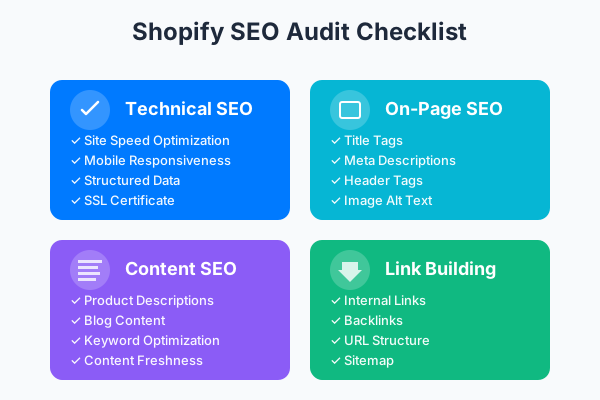
Complete SEO audit checklist for Shopify stores
Product Description Optimization
Write unique product descriptions for every item. Avoid using manufacturer descriptions, which appear across hundreds of stores and create duplicate content issues. Instead, describe products from your brand's perspective, highlighting unique features, benefits, and use cases. Include target keywords naturally within the first 100 words.
Image SEO
Every product image needs descriptive alt text that includes relevant keywords. Alt text serves dual purposes: it helps search engines understand image content and improves accessibility for visually impaired users. Write alt text like "Organic cotton t-shirt in navy blue, size medium" rather than "image1.jpg."
Large images slow your site. Compress product images before uploading while maintaining visual quality. Shopify automatically serves images in WebP format for supported browsers, further optimizing performance.
Rename image files before uploading to include relevant keywords.organic-cotton-t-shirt-navy.jpgis better than IMG_2847.jpg.
URL Structure Best Practices
Keep URLs short, descriptive, and keyword-rich. Avoid special characters, numbers, and dates. A good URL structure is:
- Products:
yourstore.com/products/product-name - Collections:
yourstore.com/collections/category-name - Blog posts:
yourstore.com/blog/post-title
Consistency matters. Once you establish a URL structure, maintain it. Changing URLs requires proper redirects to avoid losing SEO value.
Blog Content Strategy
Focus on evergreen content that remains relevant over time. Topics like "How to [achieve outcome]" and "Best [product category] for [use case]" continue attracting traffic months or years after publication. Update older posts periodically to maintain accuracy and signal freshness to search engines.
Each blog post should serve a clear purpose: answer a question, solve a problem, or help readers make purchasing decisions. Tie every post back to relevant products with natural internal links.
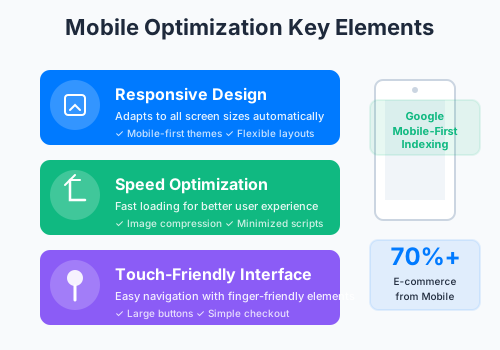
Key elements for mobile optimization (70%+ e-commerce traffic is mobile)
Common Shopify SEO Mistakes
Mistake 1: Ignoring Mobile Optimization
Many store owners focus on desktop experience while neglecting mobile users. This mistake is critical because Google uses mobile-first indexing, meaning your mobile site determines your rankings. Test your store on various mobile devices, ensure buttons are touch-friendly, and verify that checkout works smoothly on small screens.
Mistake 2: Duplicate Content Issues
Using manufacturer product descriptions verbatim creates duplicate content across hundreds of stores. Search engines may choose to rank only one version, and it might not be yours. Invest time in writing unique descriptions for at least your top-selling products. Even brief unique descriptions outperform identical copied text.
Mistake 3: Keyword Stuffing
Overusing keywords in titles, descriptions, and content reads unnaturally and can trigger search engine penalties. Write for humans first, incorporating keywords where they fit naturally. If a sentence sounds awkward with a keyword included, remove it. Modern search algorithms understand context and synonyms, so you don't need exact-match keywords in every sentence.
Mistake 4: Neglecting Site Speed
Slow-loading pages frustrate users and increase bounce rates. Studies show that each second of delay reduces conversions by approximately 7%. Audit your Shopify apps regularly—too many apps loading external scripts can significantly slow your store. Choose quality themes optimized for performance and compress all images before uploading.
Mistake 5: No Internal Linking Strategy
Failing to link between products, collections, and blog posts leaves pages isolated. Search engines discover content through links, and isolated pages may not get indexed or receive minimal authority. Every page should have at least 2-3 internal links pointing to it from other pages on your site.
Frequently Asked Questions
How long does Shopify SEO take to show results?
Is Shopify harder to optimize than WordPress for SEO?
How do I optimize Shopify product pages?
Is a Shopify blog important for SEO?
How can I improve my Shopify site speed?
Do I need an SEO app for Shopify?
What's the best way to build backlinks to my Shopify store?
How do I track Shopify SEO performance?
Ready to Optimize Your Shopify Store?
You now have a complete roadmap for Shopify SEO success. Start by auditing your current store using the strategies outlined above. Focus on quick wins first—optimizing title tags, meta descriptions, and product descriptions—then build toward long-term goals.
Related Tools and Resources
AI Product Description Generator
Create SEO-optimized product descriptions instantly
Keyword Research Tool
Discover high-value keywords for your store
SEO Audit Checklist
Comprehensive audit guide for online stores
Ecommerce Platform Comparison
Compare Shopify, WooCommerce, BigCommerce, and more
E-commerce Content Marketing Guide
Build a winning content strategy for your online store