Amazon Backend Keywords Guide: Hidden Search Terms That Boost Sales
Backend keywords are the hidden search terms that help Amazon match your products to shopper queries. Unlike visible listing content such as titles and bullet points, backend keywords are invisible to customers but essential to search performance. When used correctly, they can significantly expand your product's discoverability without cluttering your visible listing. This guide explains what backend keywords are, why they matter, and how to optimize them for better search rankings.
Try Amazon Listing Generator →What Are Amazon Backend Keywords?
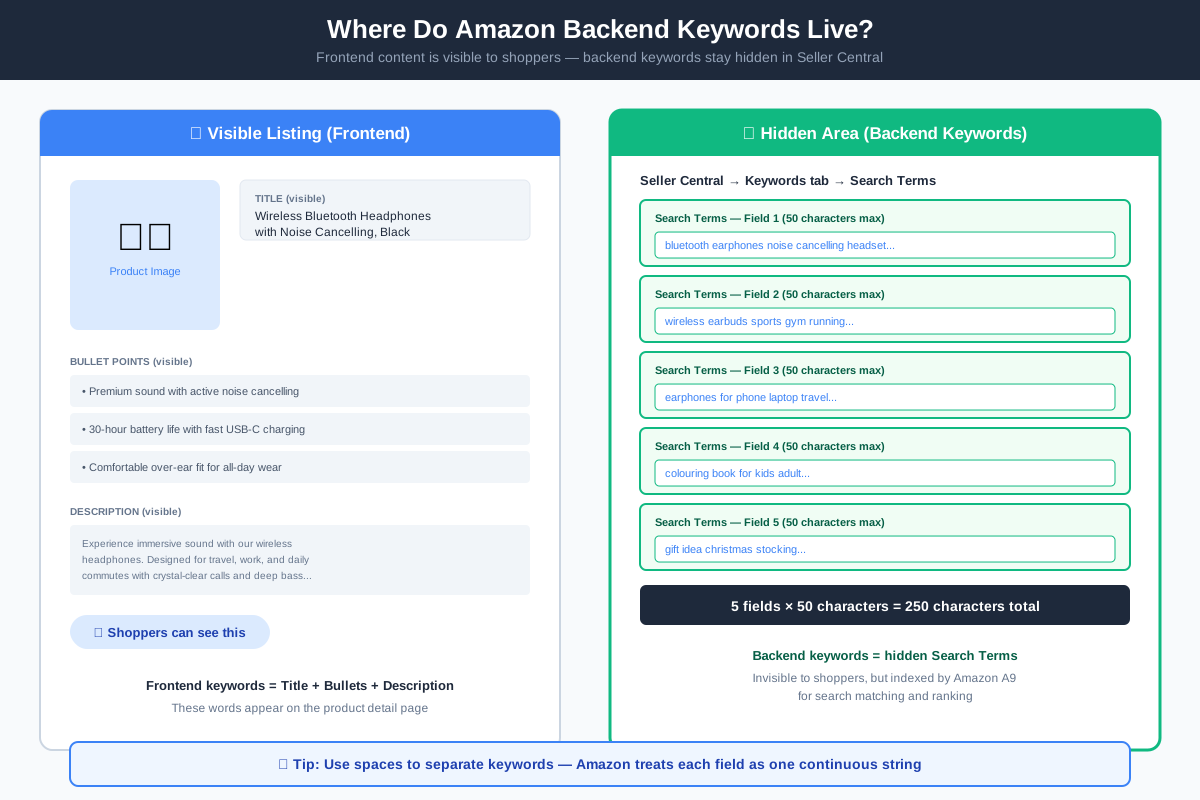
Amazon backend keywords are hidden search terms that sellers add to product listings through Seller Central. These keywords do not appear anywhere on the product detail page that shoppers see. Instead, they serve as additional signals that help Amazon's search algorithm understand what your product is and when to show it in search results.
Backend keywords are entered in the "Search Terms" fields within the Keywords tab of your product listing. Amazon provides five separate search term fields, each allowing up to 50 characters. Together, these fields give you 250 characters of additional keyword space to complement your visible content.
The key difference between backend keywords and frontend keywords lies in visibility. Frontend keywords appear in your title, bullet points, and description where customers can read them. Backend keywords remain hidden, which means you can include alternative spellings, synonyms, and related terms without affecting the readability of your listing.
Why Backend Keywords Matter
Backend keywords play a crucial role in Amazon search optimization for three main reasons.
Expanded Search Reach
Backend keywords allow you to target additional search terms that may not fit naturally in your visible listing. This increases the number of queries where your product can appear, reaching shoppers who use different terminology or spelling variations.
Supplementary Information
Some relevant keywords might dilute your listing if placed visibly. Backend keywords let you include product attributes, use cases, or compatibility information without compromising the clarity and persuasiveness of your visible content.
Algorithm Signal Boost
Amazon's A9 algorithm considers both visible and hidden keywords when determining relevance. Well-optimized backend keywords strengthen the connection between your product and relevant search queries, improving your chances of ranking for those terms.
ImageChat helps sellers identify the most effective backend keywords by analyzing competitor listings and search trends. Our tools surface high-opportunity terms that can fill your backend keyword fields strategically.
How to Optimize Backend Keywords
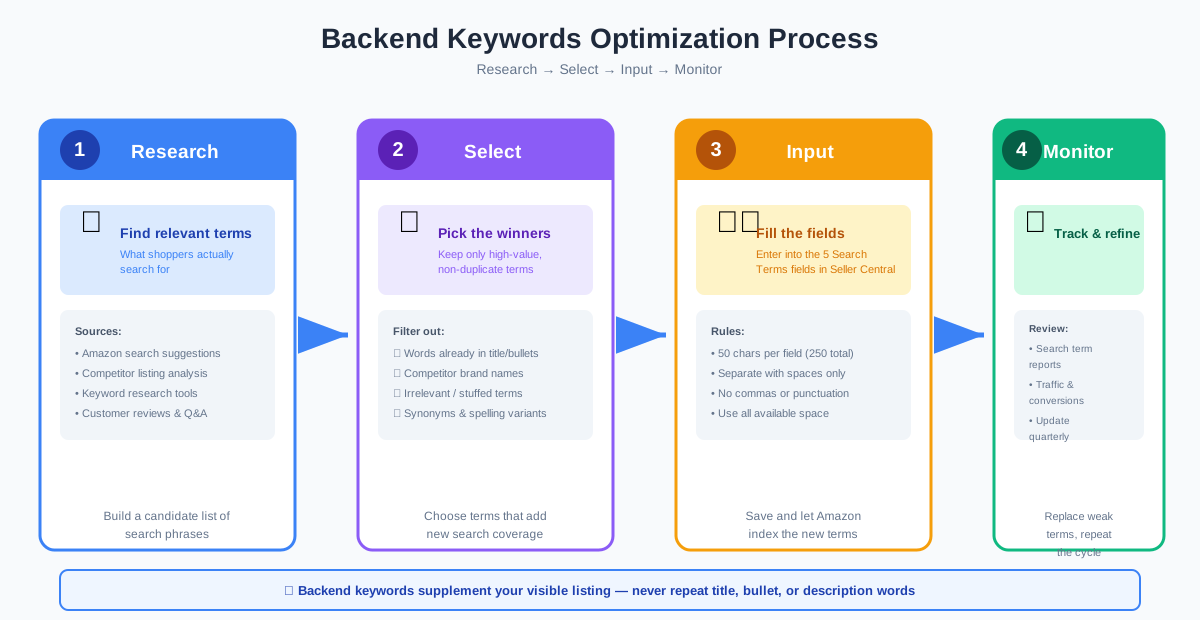
Follow these steps to make the most of your backend keyword space:
Research Relevant Search Terms
Start by identifying the terms shoppers use to find products like yours. Use Amazon's search bar suggestions, competitor analysis, and keyword research tools to compile a list of relevant phrases. Focus on terms that have search volume but are not already prominent in your title or bullets.
Respect Character Limits
Amazon allows 50 characters per search term field across five fields, totaling 250 characters. Do not exceed these limits. Use all available space efficiently by filling each field without leaving gaps.
Avoid Keyword Repetition
Never repeat keywords that already appear in your title, bullet points, or description. Backend keywords should supplement your visible content, not duplicate it. Repeating keywords wastes valuable space and may trigger Amazon's suppression algorithms.
Use Single Keywords and Short Phrases
Separate individual keywords with spaces rather than commas or other punctuation. Amazon treats the entire field as one continuous string, so spaces are sufficient. Include single words and two-to-three word phrases that capture different ways shoppers might search.
Include Synonyms and Spelling Variants
Add common misspellings, alternative spellings, and synonyms that shoppers might use. For example, if your product is a "colouring book," also include "coloring book" to capture both British and American spelling.
Test and Refine
Monitor your search term reports to see which backend keywords drive traffic and sales. Replace underperforming terms with new candidates and track changes in visibility and conversion over time.
Quick Tips for Backend Keyword Optimization
Follow these best practices to keep your backend keywords effective and compliant:
Do Not Repeat Frontend Keywords
Your backend keywords should contain only terms that do not already appear in your title, bullets, or description. Repeating visible keywords wastes space and provides no additional ranking benefit.
Use Synonyms and Spelling Variants
Include alternative words and spellings that shoppers might use. This captures search traffic from users who phrase queries differently or make common typing errors.
Avoid Prohibited Terms
Never include competitor brand names, offensive language, or misleading claims. Amazon strictly forbids these practices and may suppress listings that violate the rules. Stick to descriptive, accurate terms related to your product.
Keep Keywords Up to Date
Seasonal trends, new product features, and shifting customer language all affect keyword relevance. Review and update your backend keywords periodically to maintain alignment with current search behavior.
Common Mistakes to Avoid
Many sellers undermine their backend keyword strategy with these errors:
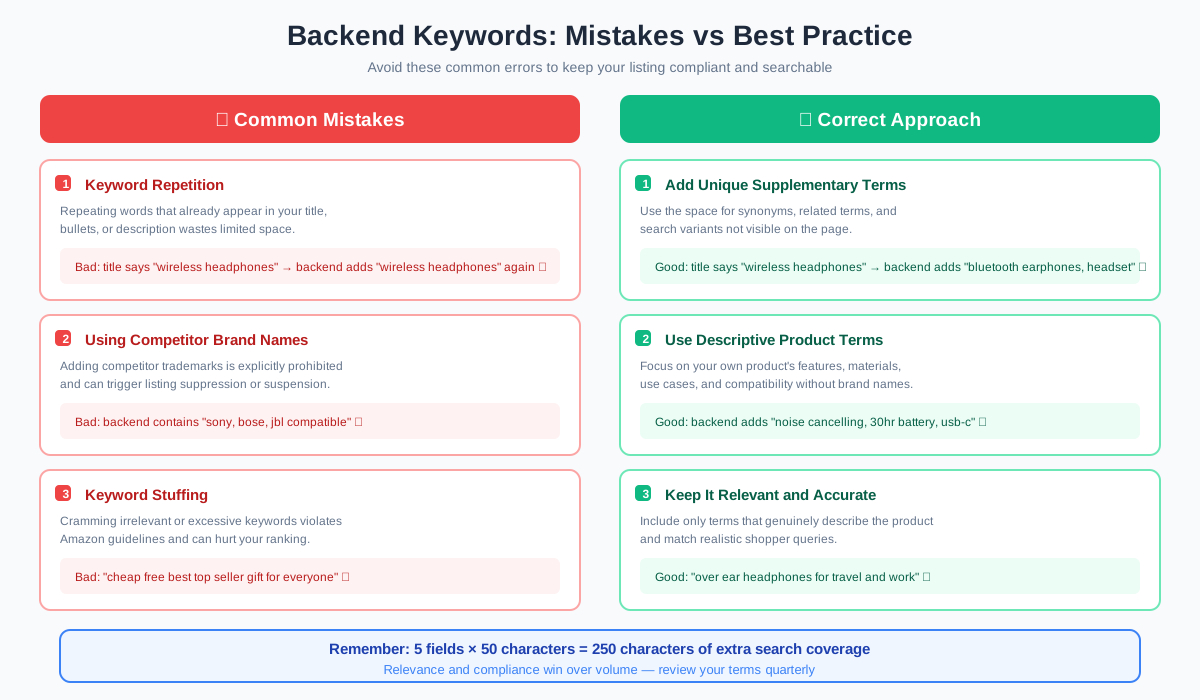
Keyword Stuffing
Cramming irrelevant or excessive keywords into backend fields violates Amazon's guidelines and can hurt your listing. Focus on relevance and quality rather than volume.
Using Competitor Brand Names
Including competitor brands in backend keywords is explicitly prohibited. Amazon detects this and may suppress your listing or suspend your seller account.
Ignoring Updates
Failing to refresh backend keywords as trends and products evolve leaves potential search visibility untapped. Make keyword review a regular part of your listing maintenance.
Frequently Asked Questions
What is the character limit for Amazon backend keywords?
Can I use competitor brand names in backend keywords?
How do I find the right backend keywords?
How often should I update backend keywords?
Do backend keywords need punctuation?
Can backend keywords include product identifiers?
Ready to Optimize Your Backend Keywords?
Use ImageChat's keyword tools to research high-opportunity terms, analyze competitor strategies, and fill your backend fields with search terms that drive visibility and sales.
Start Optimizing Now →Related Articles
Amazon Title Optimization Guide
Learn how to craft titles that rank and convert
Amazon Bullet Points Guide
Build clearer, more persuasive listing content
Amazon A9 Algorithm Guide
Understand the ranking algorithm behind Amazon search
Amazon Listing Generator
Generate SEO-ready Amazon listing copy from a product photo
Official Resources
Official guidance on search term requirements and best practices.