Example 1: 65W GaN USB-C Charger
Brand: Voltcraft Labs | Product: 65W GaN 3-Port USB-C Wall Charger
Original
Fast charging wall adapter. 65W. USB-C. Three ports. Compact design. Compatible with most devices. Foldable plug.
Optimized
Voltcraft Labs 65W GaN 3-Port USB-C Charger
- • Power output: 65W total across three ports. USB-C1 delivers up to 65W when used alone or 45W when the second USB-C port is active. USB-C2 outputs up to 30W. USB-A tops out at 22.5W with Quick Charge. The charger redistributes power automatically as you plug in and unplug devices.
- • Charging speed: Charges a 13-inch laptop to full in about 90 minutes over USB-C PD 3.0. Fast-charges a phone to 50% in roughly 25 minutes with Power Delivery PPS. Charges a tablet to 60% in about 30 minutes.
- • Size and weight:GaN III design measures 2.6 x 2.6 x 1.2 inches and weighs 4.2 ounces — about 40% smaller than a comparably rated silicon charger. The folding prongs make it pocketable for travel.
- • Compatibility: Supports USB-C Power Delivery 3.0, Programmable Power Supply (PPS), Quick Charge 4+, and Apple 2.4A. Works with laptops, tablets, phones, handheld consoles, and earbud cases that charge over USB-C. Does not power legacy barrel-jack laptops or 20V-only devices that lack a PD input.
- • Safety and warranty: Built-in 8-point protection covers overcurrent, overvoltage, overheat, and short circuit. UL listed. Includes one 100W USB-C to USB-C cable and an 18-month warranty.
This is the single charger that replaces the brick in your laptop bag, the cube beside your nightstand, and the spare in your carry-on. One device, three ports, no trade-offs on speed.
Why the optimized version works
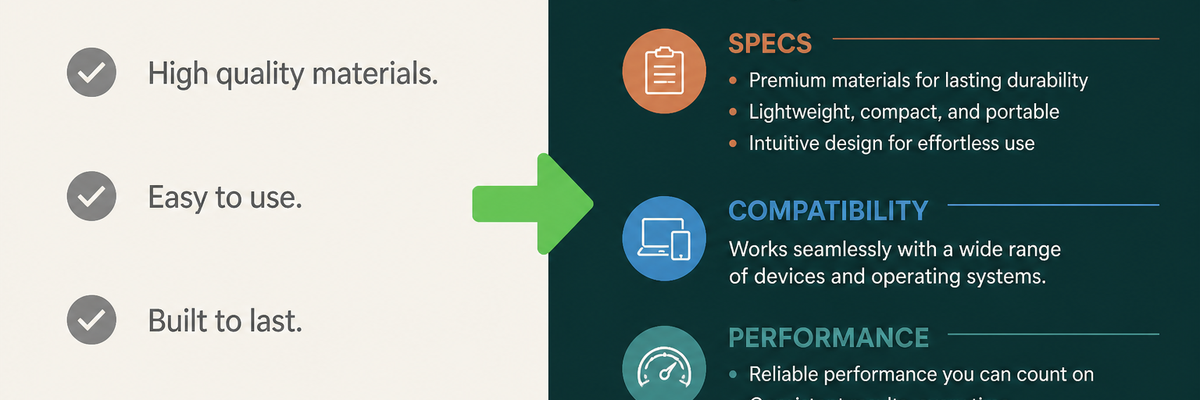
The original lists a wattage and hopes the shopper understands it. The optimized version explains what 65W actually does — how fast it charges a laptop, how the three ports share power, and which devices it will not power. Naming the standard (PD 3.0, PPS) gives technical shoppers a verifiable anchor, while the “one charger that replaces the brick” line gives everyone else a reason to care. The compatibility limits are stated directly, which is the single most effective way to prevent a return.
Example 2: True Wireless ANC Earbuds
Brand: Northwave Audio | Product: WaveBuds Pro True Wireless ANC Earbuds
Original
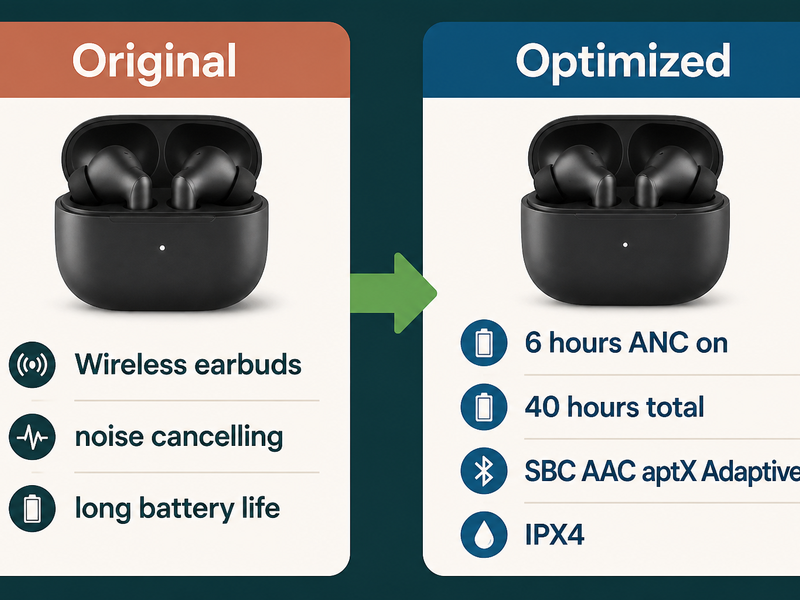
Wireless earbuds with noise cancelling. Bluetooth. Long battery life. Touch controls. Charging case included.
Optimized
Northwave Audio WaveBuds Pro — Charcoal
- • Sound:Custom 11mm dynamic drivers tuned to a 20Hz–20kHz range with a mild bass lift. Sound signature is warm, not neutral — good for pop, hip-hop, and podcasts, less suited to studio-critical listening.
- • Noise cancelling: Hybrid feed-forward and feed-back ANC reduces ambient noise by up to 42dB. Transparency mode pipes in outside sound with a tap when you need to hear a train announcement or a barista.
- • Battery: 8 hours per charge with ANC off, 6 hours with ANC on, plus 32 additional hours in the case (40 hours total). Recharges over USB-C or Qi wireless. A 10-minute charge gives about 2 hours of playback.
- • Connectivity:Bluetooth 5.3 with multipoint pairing — stay connected to a laptop and a phone at the same time and switch audio automatically. Codec support: SBC, AAC, and aptX Adaptive for lower-latency video.
- • Fit and water resistance:Four silicone ear-tip sizes included (XS–L). Each bud weighs 4.6 grams. Rated IPX4, which resists sweat and light rain but should not be submerged.
These are the earbuds you forget you are wearing. The fit is light enough for a commute, the ANC is strong enough for an open-plan office, and the case holds a full work week of listening before it needs a cable.
Why the optimized version works
“Long battery life” means nothing on its own. The optimized version breaks the number apart — 6 hours with ANC on, 40 total with the case, 2 hours from a 10-minute top-up — so the shopper can match it to their day. It also states the sound signature honestly (warm, not neutral), which sets the right expectation and heads off the review that says “bass-heavy.” Compatibility is covered by naming the Bluetooth version and the codecs rather than a vague “Bluetooth.”
Example 3: 20,000mAh Power Bank
Brand: Ridgecell | Product: 20,000mAh 22.5W Portable Power Bank
Original
Power bank with large capacity. 20000mAh. Fast charging. Two USB ports. LED indicator.
Optimized
Ridgecell 20,000mAh 22.5W Power Bank — Graphite
- • Capacity: 20,000mAh rated (74Wh). That is about 4 full charges for a standard phone, 2.5 charges for a large flagship, or 1.5 charges for a 10-inch tablet. At 74Wh it sits under the 100Wh limit for airline carry-on batteries.
- • Output:USB-C port delivers 22.5W Power Delivery in both directions (charge the bank or charge a device). USB-A port delivers 22.5W with Quick Charge 3.0. When both ports are in use they share 22.5W total — expect slower charging if you run two devices at once.
- • Recharge time: Refills in about 6.5 hours from an 18W-or-higher PD wall charger. A five-dot LED gauge shows remaining capacity in 20% steps.
- • Portability:Measures 5.9 x 2.7 x 1.0 inches and weighs 13.6 ounces — noticeably heavier than a smaller 10,000mAh bank, so it is best carried in a bag rather than a pocket.
- • Safety and contents: Battery management system guards against overcharge, overheat, and short circuit. UN38.3 transport certified. Includes one USB-C to USB-C cable; a wall charger is not included.
This is the bank you pack for a festival weekend, a long-haul flight, or a power outage — not the slim one you keep in a jacket pocket. Buy it for the days your phone will not see an outlet.
Why the optimized version works
The original gives a capacity number and nothing else. The optimized version translates milliamp-hours into charges per device, states the airline Wh limit, and admits the weight trade-off so the wrong shopper self-selects out. It also closes an expectation gap that causes countless complaints: the wall charger is not in the box. Saying so up front is cheaper than processing a return.
Example 4: 2K Indoor Security Camera
Brand: Lumen Home | Product: Lumen Cam 2K Indoor Security Camera
Original
Indoor security camera. 2K HD. Night vision. Motion detection. App control. Two-way audio. Easy setup.
Optimized
Lumen Home Lumen Cam 2K Indoor Security Camera — White
- • Video: 2560 x 1440 (2K QHD) at 30 frames per second with a 110-degree diagonal field of view, encoded in H.265 to cut storage use by roughly half versus H.264. Records in color when there is light and switches to IR at dusk.
- • Night vision: 940nm infrared LEDs light up the scene to 30 feet without the visible red glow that annoys sleepers. Works in complete darkness.
- • Detection: On-device person detection runs without a subscription and can distinguish a person from a passing car or a swaying curtain. Draw activity zones to ignore busy areas like a hallway. Alerts reach your phone in about two seconds.
- • Storage: Records to a microSD card up to 256GB (card not included) for 24/7 or event-only capture. Optional cloud plans start at one camera free; a local RTSP stream lets you record to your own NVR.
- • Power and network:Requires a constant power outlet via the included USB-C adapter — this model has no battery. Connects over 2.4GHz Wi-Fi only; it does not support 5GHz networks.
- • Privacy: A physical lens shutter slides over the camera when you are home, and all streams are encrypted in transit and at rest.
This is the camera you set on a bookshelf and forget about. Setup takes about five minutes, the free person alerts are genuinely useful, and the lens shutter means you are not trusting software to switch it off.
Why the optimized version works
Smart home listings fail most often on compatibility and recurring costs. The optimized version answers both before the shopper asks: 2.4GHz only, no 5GHz; no subscription required for person alerts; microSD not included. It also explains the reason behind a spec — H.265 cuts storage roughly in half — instead of leaving the shopper to research codecs. The privacy shutter is a purchase driver for indoor cameras, so it earns its own bullet.
Example 5: 75% Hot-Swap Mechanical Keyboard
Brand: Keyforge | Product: Keyforge K75 Hot-Swap Mechanical Keyboard
Original
Mechanical keyboard with RGB backlight. 75% layout. Hot-swappable. Wireless. PBT keycaps. Great for gaming and typing.
Optimized
Keyforge K75 Hot-Swap Mechanical Keyboard — Slate
- • Layout: 75% form factor with 82 keys, including a dedicated function row and arrow cluster. Saves about 30% of the desk width of a full-size board while keeping the keys most people use daily.
- • Switches: Hot-swap sockets accept both 3-pin and 5-pin switches, so you can change the feel without soldering. Ships with pre-lubed linear switches (45g actuation); tactile and clicky options are available at checkout.
- • Typing feel: Gasket-mounted plate with silicone dampening for a softer bottom-out and less hollow sound. Double-shot PBT keycaps, 1.5mm thick, resist the shine that develops on cheaper ABS caps.
- • Connectivity:Three modes — Bluetooth 5.1 for up to three paired devices, a 2.4GHz low-latency dongle for gaming, and wired USB-C. Switch between them with a key combo.
- • Battery: 4,000mAh battery lasts about 90 hours with the backlight off and about 25 hours at full brightness. Recharges over USB-C.
- • Software: Remap keys and build layers with VIA, no proprietary driver required. Per-key RGB with south-facing LEDs so shine-through keycaps read cleanly. Full N-key rollover in wired and 2.4GHz modes.
This is the board for someone who types all day and games at night. The hot-swap sockets mean it is the last keyboard you buy for a while — change the switches, not the whole board.
Why the optimized version works
The original says “great for gaming and typing,” which describes every keyboard ever made. The optimized version separates the two audiences with facts: 2.4GHz and N-key rollover for gamers, gasket mounting and PBT caps for typists. It explains why each spec matters — hot-swap means no soldering, south-facing LEDs mean clean keycap lighting — and names the software (VIA) so power users know the board is not locked down.
Key Takeaways
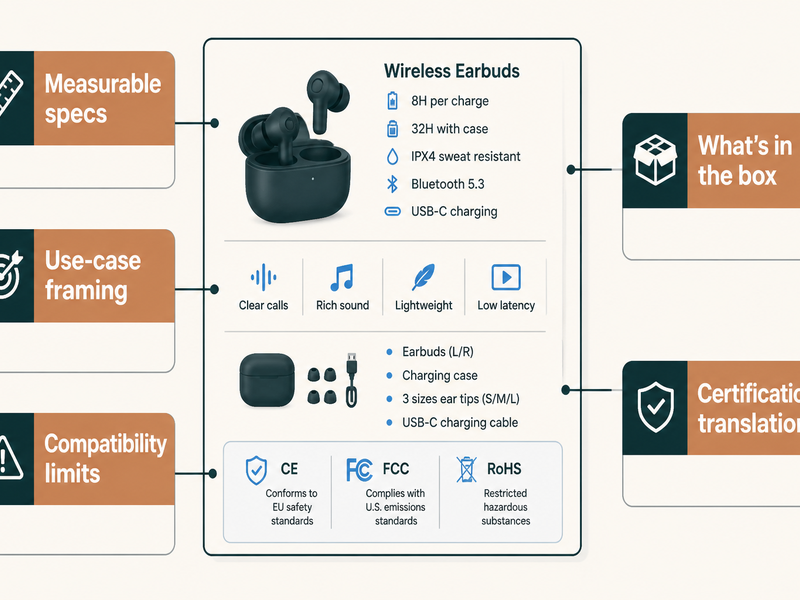
Across all five examples, the same pattern repeats. The original descriptions name a category and a couple of numbers. The optimized versions explain what those numbers mean in use, what the product works with, what it does not, and what the shopper actually receives. The differences that move the needle:
- 1. Replace adjectives with measurable specs. “Fast charging” becomes “65W, or a full laptop charge in 90 minutes.” “Long battery life” becomes “6 hours with ANC on, 40 hours with the case.” Numbers build trust; adjectives do not.
- 2. Quantify performance in real-world outcomes.Specs alone still leave shoppers doing math. Translate them: 20,000mAh into “about 4 phone charges,” 74Wh into “under the airline carry-on limit.”
- 3. State compatibility in both directions.List what the product supports and what it does not. “2.4GHz Wi-Fi only, no 5GHz” and “does not power legacy barrel-jack laptops” prevent the returns that no amount of marketing can undo.
- 4. Disclose what is not in the box.“Wall charger not included,” “microSD card not included.” These small omissions drive a disproportionate share of customer complaints and one-star reviews.
- 5. Translate certifications and standards.PD 3.0, Bluetooth 5.3, IPX4, UL, UN38.3 — these are trust signals for knowledgeable buyers and noise for everyone else. Say what each one means in plain language so the benefit lands either way.
For a deeper framework on structuring descriptions for Amazon, Shopify, and Etsy, see our Electronics Product Description Guide.
Create Your Tech Description Now
These examples show the difference between a description that lists features and one that sells. Writing optimized descriptions for a full electronics catalog by hand takes hours. ImageChat’s Product Description Generator turns a product photo and a few specs into a structured draft — title, benefit-first bullets, compatibility notes, and a use-case line — ready for review and publishing.
Generate Electronics Product DescriptionsFrequently Asked Questions
What makes a good tech product description?
A good tech product description states measurable specifications, translates them into real-world performance, lists compatibility in both directions, discloses box contents, and ends with a use-case line that helps the shopper picture owning the product. It avoids vague adjectives like “premium” or “advanced” in favor of facts a shopper can verify before buying.
How long should an electronics product description be?
It depends on the platform. Amazon descriptions should stay under 2,000 characters with five benefit-first bullets. Shopify product pages typically use 200–500 words across scannable sections. Etsy listings run 100–300 words and lean conversational. The goal is completeness, not length — every decision-critical spec should be present without padding.
How do I describe a gadget with dozens of specifications?
Group specs into the four or five categories shoppers actually compare: performance, compatibility, physical size and weight, power and battery, and what is in the box. Lead each bullet with the category label, then the number, then what it means in use. A shopper scanning “Power output: 65W total” finds it instantly; the same fact buried in a paragraph gets skipped.
Should I list what a tech product is not compatible with?
Yes, always. Naming what a product does not work with is one of the most effective ways to reduce returns. “2.4GHz Wi-Fi only,” “does not support Lightning connectors,” and “no wall charger included” filter out the wrong buyer before they purchase and set accurate expectations for the right one.
Can AI write tech product descriptions?
AI tools like ImageChat’s Product Description Generator can draft structured descriptions from a product photo and a few inputs, including spec tables, compatibility notes, and use cases. Use the AI output as a first draft, then verify every specification for accuracy, confirm compatibility claims against the manufacturer, and add platform-specific formatting. AI produces the structure fastest; human review guarantees technical correctness.
How do better descriptions reduce electronics returns?
Consumer electronics carries one of the highest return rates in retail, and its leading causes — product did not match the description and compatibility issues — are both fixable in the copy. According to the National Retail Federation, electronics return rates run well above the all-retail average, driven largely by mismatched expectations. When a description states exact specs, honest limitations, and box contents, shoppers receive what they expected and send less back.
Generate Electronics Product Descriptions With ImageChat
Paste a product image, add the category and key specs, and get a platform-ready description in seconds. Verify every specification before it goes live, then publish across Amazon, Shopify, and your own store.
Generate Electronics Product DescriptionsRelated Resources
- Product Description Generator — Create descriptions from product images
- Electronics Product Description Guide — Complete framework for writing electronics descriptions
- SEO Metadata Generator — Generate titles, descriptions, and keywords for your pages
References
- National Retail Federation: Consumer Returns in the Retail Industry — Research on return rates and reasons across retail categories including consumer electronics
- USB Implementers Forum — Official specifications for USB Power Delivery and the standards referenced in charger descriptions
- Bluetooth SIG — Authoritative specifications for Bluetooth versions, profiles, and codecs cited in device listings