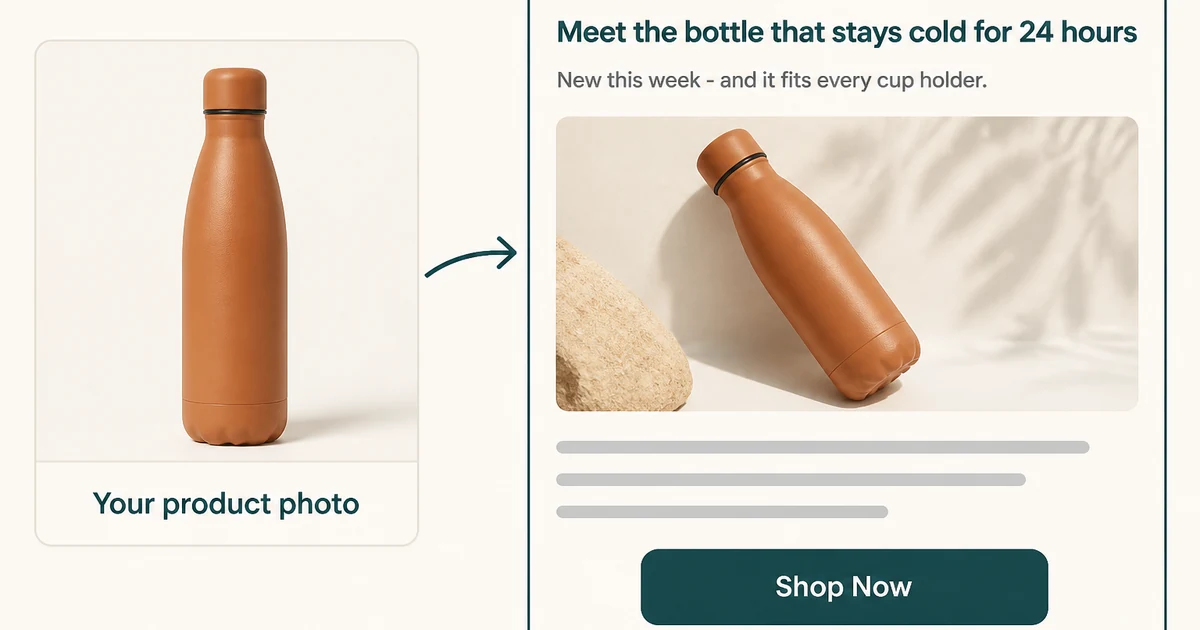
A promotional email is decided before anyone scrolls: the subject line earns the open, preview text earns the second look, and the body turns a distracted reader into a click. ImageChat writes complete, editable email variations for product launches, seasonal sales, restocks, and win-backs.
What you get
- Subject lines, preview text, hero headline, body and CTA
- Launch, sale, restock and win-back email types
- Copy tuned to your offer, deadline and price
- Tone options from urgent to warm and brand-led
- Multiple variations for A/B testing
- Wording grounded in your real product photo
What Is a Promotional Email Generator?
A promotional email generator writes marketing email copy from a few inputs about your product, offer, audience, and campaign goal. Instead of drafting in a blank campaign editor, you describe what you are promoting and receive several editable variations.
Email has its own constraints: the subject competes inside a crowded inbox, preview text completes the first impression, and the body should carry one clear offer. For promotions beyond email, use the general Ad Copy Generator or Facebook Ad Copy Generator. Pair campaigns with the Product Description Generator for the page they link to.
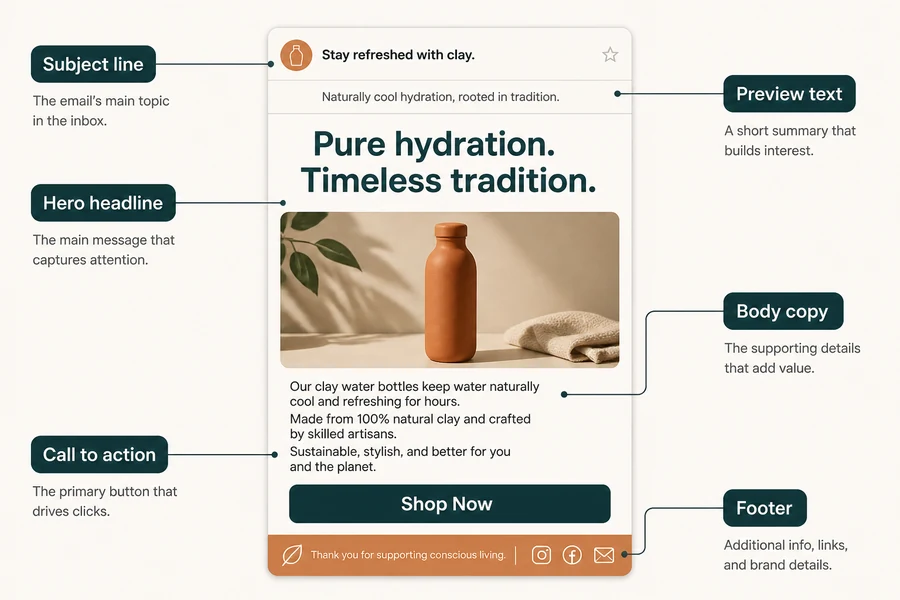
The Six Parts of a Promotional Email
| Part | Where it appears | What it does | Typical length |
|---|---|---|---|
| Subject line | In the inbox | The reason to open | 30–50 characters |
| Preview text | Next to the subject | A second reason to open | 40–90 characters |
| Hero headline | Top of the body | A scannable offer restatement | 4–9 words |
| Body copy | Below the headline | The detail and proof | 40–120 words |
| Call to action | Button or link | The single next step | 2–5 words |
| Footer | Bottom of email | Trust and unsubscribe | Platform-defined |
Keep one clear offer in focus. Lead with the benefit or deadline, let the image and words divide the work, and make the next action obvious. Confirm current deliverability guidance in the Gmail bulk sender guidelines.
Promotional Email Examples
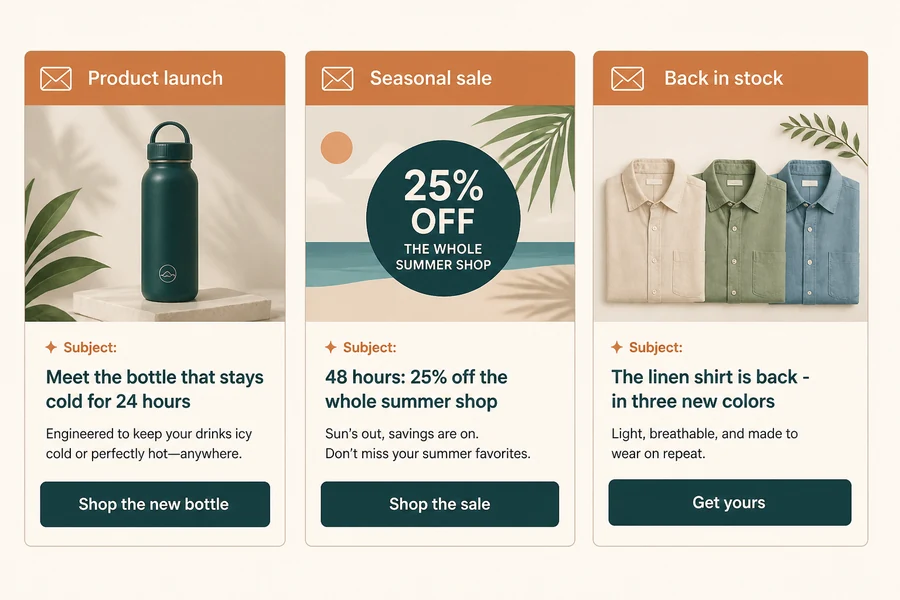
The same generator output changes with the campaign type: a launch builds desire, a sale leads with the discount and deadline, and a restock uses relevant scarcity.
- Product launch: “Meet the bottle that stays cold for 24 hours.” CTA: Shop the new bottle.
- Seasonal sale: “48 hours: 25% off the whole summer shop.” CTA: Shop the sale.
- Back in stock: “The linen shirt is back—in three new colors.” CTA: Get yours before it’s gone.
How to Generate a Promotional Email in ImageChat
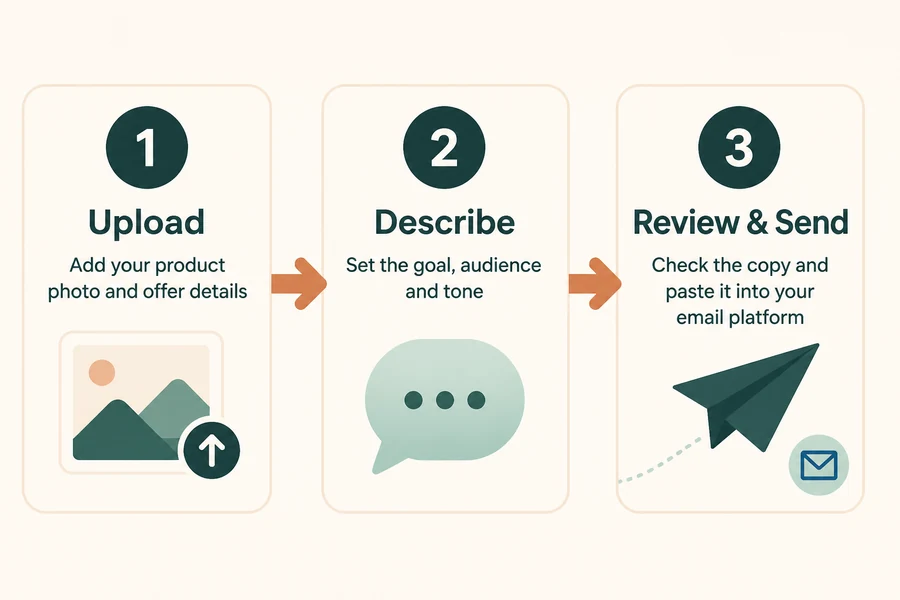
1. Upload your product photo and details.
Add the product image plus the offer, price, deadline, and facts the email must carry.
2. Set the goal, audience, and tone.
Choose launch, sale, restock, or win-back, then describe your audience and brand voice.
3. Review, refine, and send.
Compare complete variations, edit the winner, and paste it into your email platform to schedule.
FAQ
What is a promotional email generator?
A promotional email generator writes subject lines, preview text, hero headlines, body copy, and calls to action from your product, offer, audience, and campaign goal. It produces editable draft variations so you start from a working message instead of a blank campaign.
What makes a promotional email different from a regular email?
A promotional email has a commercial goal: it asks the reader to buy, claim an offer, or act before a deadline. The subject leads with the offer, the body carries one clear next step, and the call to action is explicit.
How long should a promotional email be?
Keep the subject within about 30–50 characters, preview text within about 40–90 characters, and the body in the 40–120 word range with one headline and one button. Link to a product page when more detail is needed.
Can AI-written promotional emails match my brand voice?
Yes. Describe your tone and the words or claims you always use, then review the draft for your exact offer, price, and phrasing before sending.
Will the copy work with my email platform?
Yes. The output is plain text you can paste into Mailchimp, Klaviyo, Brevo, or another platform. Add rich formatting, links, and your footer in the platform itself.
How do I keep promotional emails out of the spam folder?
Send to opted-in subscribers, keep a consistent sender identity, include an easy unsubscribe, avoid misleading claims, and follow the current Gmail bulk sender guidelines.
Create Your Promotional Email Now
Upload a product photo, describe your offer and audience, and turn it into a message you can paste and schedule. Start with a few variations and let the data pick the winner.
Open the ImageChat Tool →