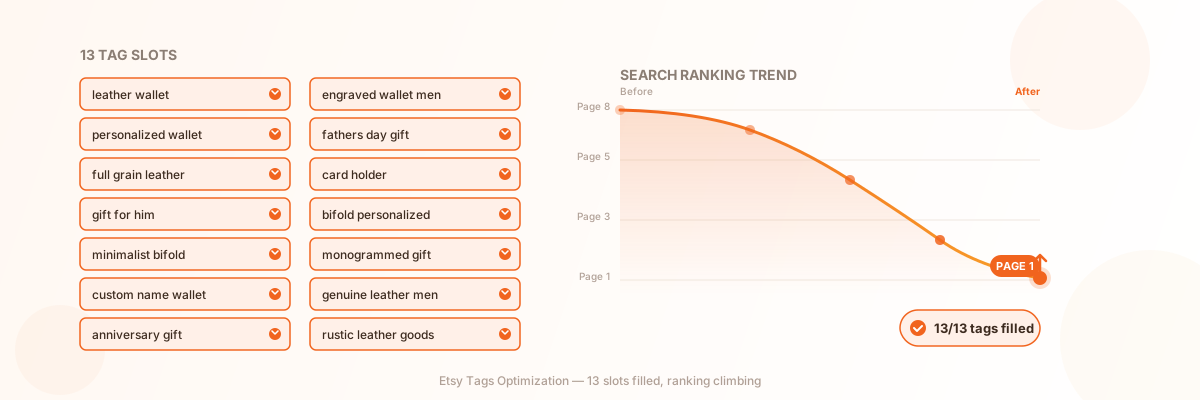
What is Etsy Tags Optimization
Etsy tags optimization is the process of strategically selecting and organizing the 13 tags assigned to each listing to maximize search visibility. Tags are short descriptive phrases — up to 20 characters each — that tell Etsy’s search algorithm what your product is, who it’s for, and what occasions or use cases it serves.
How Tags Work in Etsy Search
When a shopper types a query into Etsy’s search bar, the algorithm performs query matching across multiple listing fields: title, tags, description, and attributes. Tags are one of the primary matching signals. If a shopper searches for “personalized leather wallet” and your listing has that exact phrase as a tag, your listing enters the candidate pool for that search.
Once matched, Etsy ranks your listing against all other matched listings using factors like listing quality score, customer service metrics, and recency. Tags get you into the pool — ranking determines where you appear within it. Both matter, but you cannot rank for a query you never matched in the first place.
Tags vs. Attributes vs. Title Keywords
Etsy’s search algorithm looks at your listing holistically, but each field serves a distinct purpose:
- • Title keywords carry the most weight in query matching. Your title should lead with your primary keyword phrase.
- • Attributes are structured fields (color, material, occasion, style) that power Etsy’s filter sidebar. When a shopper filters by “blue” or “cotton,” only listings with that attribute appear.
- • Tags supplement both. They capture search phrases that don’t fit naturally in your title and cover angles attributes can’t express — aspirational terms like “gift for her,” niche descriptors like “boho wedding decor,” or alternative phrasings shoppers might use.
According to Etsy’s official Help Center guide on tags, tags are especially helpful when there’s no matching attribute available, and they’re ideal for buyer-minded search terms that describe intent rather than product specs.
Why Etsy Tags Matter
Tags are not a nice-to-have. They directly determine which search queries your listing can match, and therefore how many shoppers ever see your product.
Search Ranking Impact
Etsy gives you exactly 13 tag slots. Each one is an independent opportunity to match a different search query. A listing that uses only 5 tags competes for 5 keyword phrases; a listing that uses all 13 competes for up to 13 — more than doubling its potential search footprint. Etsy’s Help Center explicitly states that each tag is “an opportunity to be matched with a shopper’s search.”
The math is straightforward: more relevant tags means more query matches, which means more impressions. More impressions lead to more clicks. More clicks and sales feed back into your listing quality score, which improves your ranking within each matched query. Tags are the entry point to this entire flywheel.
Traffic Acquisition
Sellers who optimize their tags systematically often see measurable traffic changes. Common patterns include:
- • Listing views increasing as tags match search queries the title alone didn’t cover
- • Discovery from long-tail searches that high-volume competitors aren’t targeting
- • Filter visibility improving as tags supplement attributes for category-specific browsing
- • Shop visits growing as individual listings pull in traffic from diverse search angles
The sellers who benefit most are those who treat tags as a strategic asset — researching, testing, and iterating — rather than filling them in as an afterthought.
How Image Chat Helps with Tag Optimization
Researching and writing 13 unique, relevant tags for every listing is tedious, especially for shops with dozens or hundreds of products. Image Chat helps Etsy sellers generate keyword-aware tag sets based on product images and descriptions, suggest long-tail variations, and maintain tag diversity across an entire catalog. Instead of reusing the same tags or leaving slots empty, you can produce a full 13-tag strategy for each listing in seconds.
How to Optimize Etsy Tags
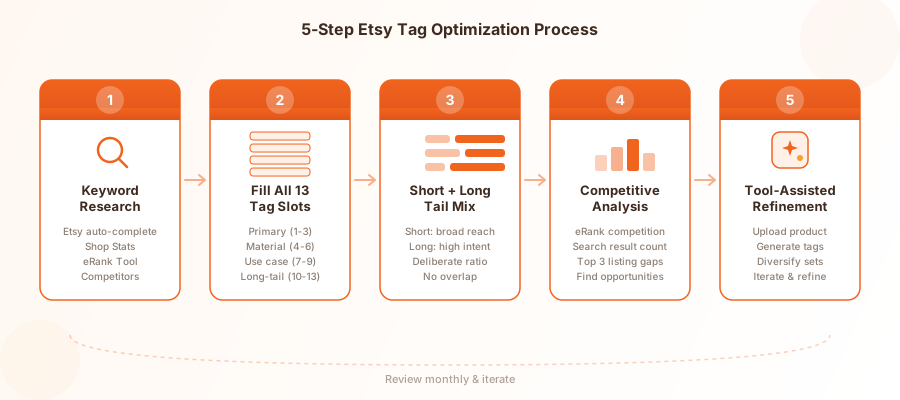
Step 1: Keyword Research
Before writing a single tag, you need to know what shoppers are actually searching for. Keyword research is the foundation of every tag decision.
Where to find Etsy keywords:
- • Etsy search bar auto-complete: Type your product category and note the suggested completions. These reflect real, current shopper searches on Etsy.
- • Etsy Shop Stats: Check which search terms are already bringing traffic to your listings. Double down on what works and find variations.
- • eRank Keyword Tool: Provides monthly search volume, competition level, and click-through rate for Etsy keywords. eRank color-codes results so you can quickly spot high-search, low-competition terms.
- • Competitor listings: Study the tags of top-ranking listings in your category. eRank’s tag research guide shows how to view any shop’s tags and analyze their performance.
What to look for:
- • Keywords with moderate-to-high search volume and low-to-moderate competition
- • Long-tail phrases (3+ words) that signal specific purchase intent
- • Seasonal and trending terms relevant to your product
- • Alternative phrasings and synonyms shoppers might use
Step 2: Fill All 13 Tag Slots
Etsy allows up to 13 tags per listing, and you should use every single one. Leaving slots empty is the equivalent of turning away free search traffic — each unused tag is a search query your listing can’t match.
Tag allocation framework:
| Slots | Purpose | Example |
|---|---|---|
| 1–3 | Primary keywords (match your title) | “leather wallet,” “personalized wallet” |
| 4–6 | Materials and style | “full grain leather,” “minimalist,” “bifold” |
| 7–9 | Use cases and occasions | “gift for him,” “anniversary gift,” “fathers day” |
| 10–11 | Long-tail phrases | “engraved leather wallet men,” “custom name wallet” |
| 12–13 | Synonyms and alternatives | “card holder,” “bifold wallet personalized” |
This framework ensures your tags cover the full spectrum of how shoppers might search for your product — from broad category terms to specific, high-intent phrases.
Step 3: Short-Tail + Long-Tail Tag Combination
A common mistake is filling all 13 slots with either only broad terms or only highly specific phrases. The best strategy is a deliberate mix.
Short-tail tags(1–2 words) match broad searches with high volume but intense competition. They get your listing into large candidate pools. Examples: “leather wallet,” “gift for him.”
Long-tail tags(3+ words) match specific searches with lower volume but much higher conversion intent. The shopper who searches “personalized leather wallet engraved men” knows exactly what they want. Examples: “engraved leather wallet men,” “custom name bifold wallet.”
Etsy’s algorithm also matches longer search queries to shorter tags. If a shopper searches “handmade personalized leather wallet for men,” your “leather wallet” tag can still match. But the reverse is not always true — a one-word tag like “wallet” is less likely to match a specific multi-word query effectively. Use long-tail tags to capture precise, high-converting searches, and short-tail tags to cast a wider net.
Step 4: Competitive Analysis
Your tags don’t exist in a vacuum — they compete against every other listing using the same keywords. Before finalizing your tag set, check the competition.
How to analyze tag competition:
- • Use eRank’s Keyword Tool to see the competition level for each tag. eRank rates competition as high, medium, or low based on the number of listings using that keyword.
- • Search the tag on Etsy directly and note how many results appear. A tag with 100,000+ competing listings is extremely hard to rank for; one with 2,000–5,000 is much more achievable.
- • Study the top 3 listings for your target keyword. Do they use the same tag? What other tags do they use? Can you find gaps they’re not covering?
- • Look for keyword opportunities with decent search volume but weak competition. These are your highest-value tags.
Replace tags that show high competition and low performance with alternatives after 30 days of tracking in Shop Stats.
Step 5: Tool-Assisted Optimization with Image Chat
Manually researching and writing 13 optimized tags for every listing is the bottleneck that causes most sellers to give up on tag optimization. Image Chat streamlines this process.
How to use Image Chat for Etsy tags:
- 1. Upload your product image or paste your listing description
- 2. Image Chat analyzes the visual content and generates keyword-aware tag suggestions
- 3. Review the suggested tags, filter for relevance, and select 13 that cover your primary, variation, use-case, and long-tail categories
- 4. Copy the tag set directly into your Etsy listing form
- 5. Generate variant tag sets for similar listings to maintain diversity across your shop
For shops with many listings, Image Chat can produce unique tag sets for each product in seconds, ensuring no two listings cannibalize the same keywords and every slot is filled.
Etsy Tags Best Practices
Use All 13 Tags, Every Time
This bears repeating: use all 13 tag slots on every listing. Etsy’s Help Center confirms that each tag is a separate matching opportunity. Leaving even one slot empty reduces your search visibility. There is no scenario where fewer tags is better.
Use Multi-Word Phrases
Single-word tags like “mug,” “necklace,” or “gift” compete against hundreds of thousands of listings and attract browsers who don’t know what they want. Multi-word phrases like “ceramic coffee mug” or “personalized name necklace” have lower competition and attract buyers with clear purchase intent. eRank’s tag research guide specifically recommends avoiding one-word tags whenever possible.
Keep Tags Under 20 Characters
Each tag can contain up to 20 characters. Tags can include spaces, letters, numbers, apostrophes (') and hyphens (-), but cannot start with these special characters. Plan your phrases to fit within the limit. “Personalized leather wallet” is 27 characters — too long. “leather wallet men” (18 characters) fits perfectly.
Diversify Across Listings
Avoid using the same 13 tags on every listing. If all your listings share identical tags, they compete against each other in the same searches. Instead, give each listing a unique tag set that targets different search queries. This expands your shop’s total search footprint instead of cannibalizing it.
Update Seasonally
Search behavior shifts with seasons, holidays, and trends. Refresh seasonal tags 4–6 weeks before peak shopping periods. For example, add “Christmas gift” and “holiday present” tags in early November, then swap them for “Valentine’s Day gift” in mid-January. Review tag performance monthly in Etsy Shop Stats and replace tags that generate no views after 30 days.
Include Buyer Intent Phrases
Tags that describe who the product is for or when it’s given — “gift for her,” “wedding favor,” “baby shower gift,” “housewarming present” — capture searches where the shopper is in a buying mindset. Etsy notes that tags are ideal for these aspirational, buyer-minded terms that attributes can’t express.
Common Etsy Tag Mistakes
1. Leaving Tag Slots Empty
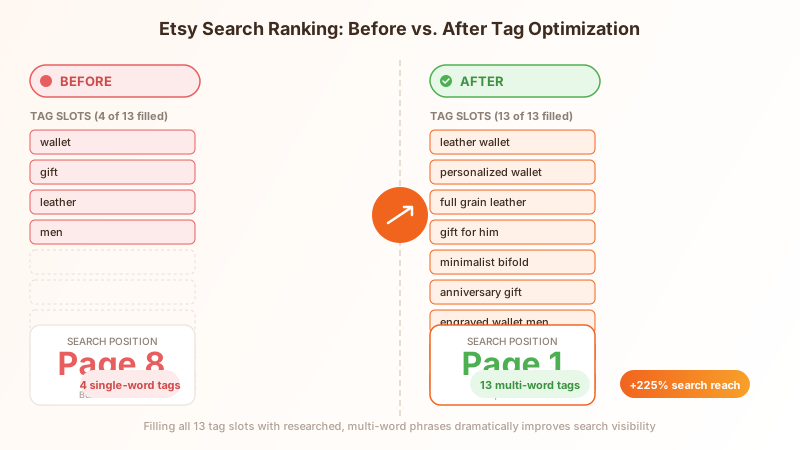
The most common and damaging mistake. Some sellers fill 5–6 tags and move on, not realizing they’re leaving half their search matching opportunities unused. Every empty slot is a search query your listing can’t match. Always fill all 13.
2. Using Single-Word Tags
“Necklace,” “ring,” and “bracelet” are one-word tags that match millions of listings. The shopper searching “necklace” could want a diamond pendant, a beaded choker, or a silver chain — your product may not be what they’re looking for. Use specific, multi-word phrases that attract buyers who know what they want.
3. Repeating Tags Across All Listings
Copy-pasting the same 13 tags across your entire shop means all your listings compete for the same searches. Only one of your listings can appear at the top for any given query — the rest are wasted. Give each listing a unique tag set targeting different keywords.
4. Duplicating Title Keywords Unnecessarily
Tags should supplement your title, not duplicate it word-for-word. If your title already says “Personalized Leather Dog Collar,” repeating “personalized leather dog collar” as a tag wastes a slot. Instead, use that slot for a phrase not in your title, like “custom pet collar” or “engraved dog name tag.”
5. Using Irrelevant or Misleading Tags
Adding trending tags that have nothing to do with your product — like “TikTok viral” or “Stanley cup” on a handmade scarf — may generate a few extra impressions but damages your listing quality score. Etsy’s algorithm tracks whether shoppers who click your listing actually engage (favorite, purchase). High bounce rates from irrelevant tags push your ranking down. Only use tags that accurately describe your product.
6. Ignoring Tag Performance Data
Tags are not set-and-forget. Etsy Shop Stats shows which search terms bring traffic to each listing. If a tag generates zero views after 30 days, replace it. eRank’s Health Check Report can also flag listings with missing tags, one-word tags, or spelling issues. Review and refine your tags at least quarterly.
Frequently Asked Questions
How many tags can I use on an Etsy listing?
Etsy allows up to 13 tags per listing, and each tag can contain up to 20 characters. You should always use all 13 slots — each tag is a separate opportunity to match a shopper's search query. Using fewer than 13 directly limits your search visibility.
How many characters can an Etsy tag have?
Each Etsy tag can contain up to 20 characters, including spaces. Tags can include letters, numbers, spaces, apostrophes (') and hyphens (-), but cannot start with an apostrophe or hyphen. Plan your keyword phrases to fit within the 20-character limit.
Should I use single-word or multi-word tags?
Always prefer multi-word tags over single words. "Ceramic coffee mug" is far more effective than "mug" because it has lower competition and attracts shoppers with specific purchase intent. eRank recommends using longer, descriptive keywords whenever possible, as one-word tags tend to be highly saturated and attract browsers rather than buyers.
Can I use the same tags on multiple listings?
You can, but you shouldn't. Using identical tags across all your listings means they compete against each other for the same search queries. Diversify your tag sets so each listing targets a unique set of keywords, expanding your shop's total search visibility.
How often should I update my Etsy tags?
Review your tag performance monthly in Etsy Shop Stats. Replace tags that generate no views after 30 days. Refresh seasonal tags 4–6 weeks before peak shopping periods. Conduct a full tag audit at least quarterly to align with changing search trends and Etsy algorithm updates.
Do Etsy tags need to match my title exactly?
No. Tags should complement your title, not duplicate it. Include your primary keyword in both your title and tags for reinforcement, but use the remaining tag slots for phrases not already covered in your title. This captures additional search queries without wasting slots on redundancy.
What are the best tools for Etsy tag research?
The best tools for Etsy tag research are eRank and Marmalead for keyword volume and competition data, Etsy's search bar auto-complete for real shopper queries, and Etsy Shop Stats for performance data on tags already driving traffic. Image Chat helps generate optimized tag sets from your product images and descriptions, speeding up the process for shops with many listings.
Can irrelevant tags hurt my Etsy ranking?
Yes. Using tags that don't accurately describe your product may generate impressions from unrelated searches, but shoppers who click and quickly leave signal to Etsy that your listing doesn't satisfy their query. This damages your listing quality score and can push your ranking down. Always use tags that accurately reflect your product.
Start Optimizing Your Etsy Tags Now
Etsy tags are the fastest SEO win available on the platform. If you’re not using all 13 slots with researched, relevant, multi-word phrases, you’re leaving search traffic on the table. Start by auditing your existing listings and applying the 5-step process in this guide.
Start Optimizing Your Etsy Tags NowRelated Resources
- Etsy SEO Tips: Complete Guide — Master the full Etsy SEO picture: titles, descriptions, attributes, and shop-wide optimization
- Etsy Shop Optimization Guide — Strategies for improving your shop’s overall visibility and conversion
- AI Product Description Generator — Generate keyword-optimized listing copy and tag sets from your product images
- Shopify SEO Guide — Cross-platform SEO strategies for your e-commerce store
- Amazon Backend Keywords Guide — How hidden keywords work on Amazon vs. tags on Etsy