The best Shopify product pages do not rely on chance. They follow a clear structure that removes doubt, answers questions, and makes the purchase decision feel easy. This guide breaks down the essential Shopify product page best practices for 2026.
You will learn what elements belong on every page, how to arrange them, what to avoid, and how to optimize for both conversions and search visibility. If you want product pages that actually sell, this is where to start.
What Makes a High-Converting Shopify Product Page
A high-converting Shopify product page removes friction while building confidence. The visitor should be able to understand what the product is, why it matters, whether it fits their needs, and how to buy it, all without leaving the page or feeling uncertain.
The most effective product pages share common characteristics:
- ✓Clear product identity: The visitor knows what the product is within seconds
- ✓Benefit-led copy: The description explains outcomes, not just specifications
- ✓Multiple high-quality images: Shoppers can examine the product from different angles
- ✓Visible social proof: Reviews and testimonials appear near the decision point
- ✓Obvious pricing and availability: No surprises when the shopper reaches checkout
- ✓Strong call to action: The Add to Cart button stands out and is easy to tap
Shopify emphasizes that product pages should explain what a product is and why it is worth purchasing, while giving customers helpful feature and benefit information. Google Search Central similarly notes that ecommerce pages benefit from clear product data, structured markup, and signals that help search engines understand availability, price, and reviews.
Core Elements of a Shopify Product Page
Every Shopify product page should include these foundational elements. Skipping any one of them adds friction and reduces conversion potential.
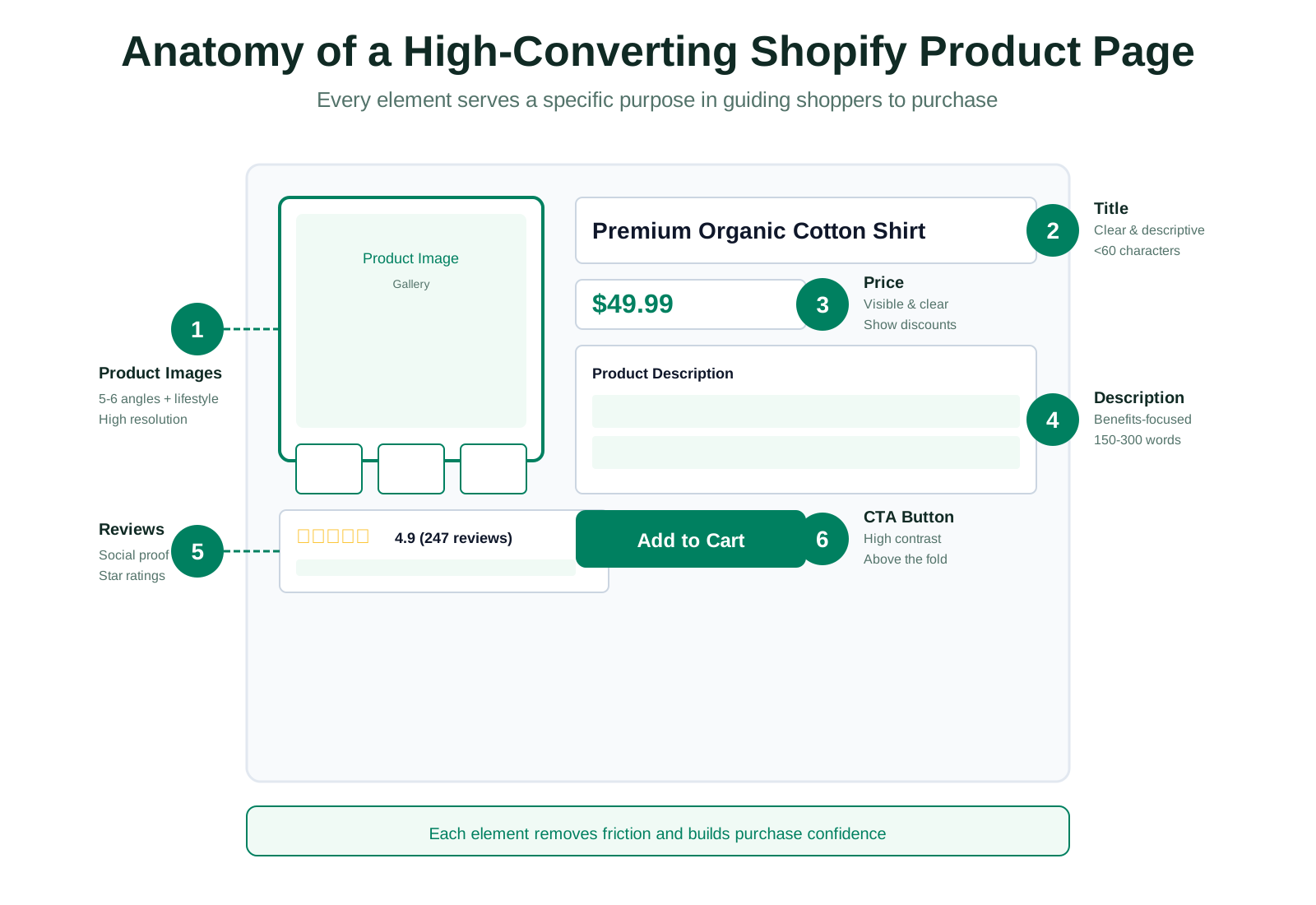
1. Product Title
Your product title is the first thing shoppers read. It should be descriptive, specific, and include relevant keywords naturally.
- • Lead with the product name and primary category
- • Include key attributes like material, color, or size when relevant
- • Keep titles under 60 characters for optimal search display
- • Avoid promotional phrases like "best seller" or "amazing"
Examples:
Weak: "Blue Cotton Shirt"
Strong: "Men's Organic Cotton Blue Shirt - Relaxed Fit"
2. Product Images
Images are the most influential element on a product page. Shoppers cannot touch or hold the product online, so visuals must compensate. Research from Growth Suite indicates that high-converting product pages typically include 5 to 6 images: front view, back view, close-up detail, scale reference, lifestyle shot, and packaging.
- • Use high-resolution images (at least 1000px on the longest side)
- • Show the product from multiple angles
- • Include lifestyle images that show the product in use
- • Add zoom functionality for detail viewing
- • Optimize file sizes for fast loading (under 200KB per image)
- • Write descriptive alt text for every image
Alt text serves both accessibility and SEO. A good alt text describes the image while including relevant keywords: "Men's organic cotton blue shirt laid flat on white background" is better than "shirt image."
3. Price and Availability
Price transparency builds trust. Display the price prominently near the product title. If the product is on sale, show both the original price and the discounted price so shoppers understand the value.
Include clear availability information. Nothing frustrates a shopper more than deciding to buy only to discover the product is out of stock. If an item is low in stock, consider displaying "Only 3 left" to create urgency without deception.
4. Product Description
Your product description answers the questions shoppers have before they ask them. A good description explains what the product is, who it is for, how it works, and why it is worth buying.
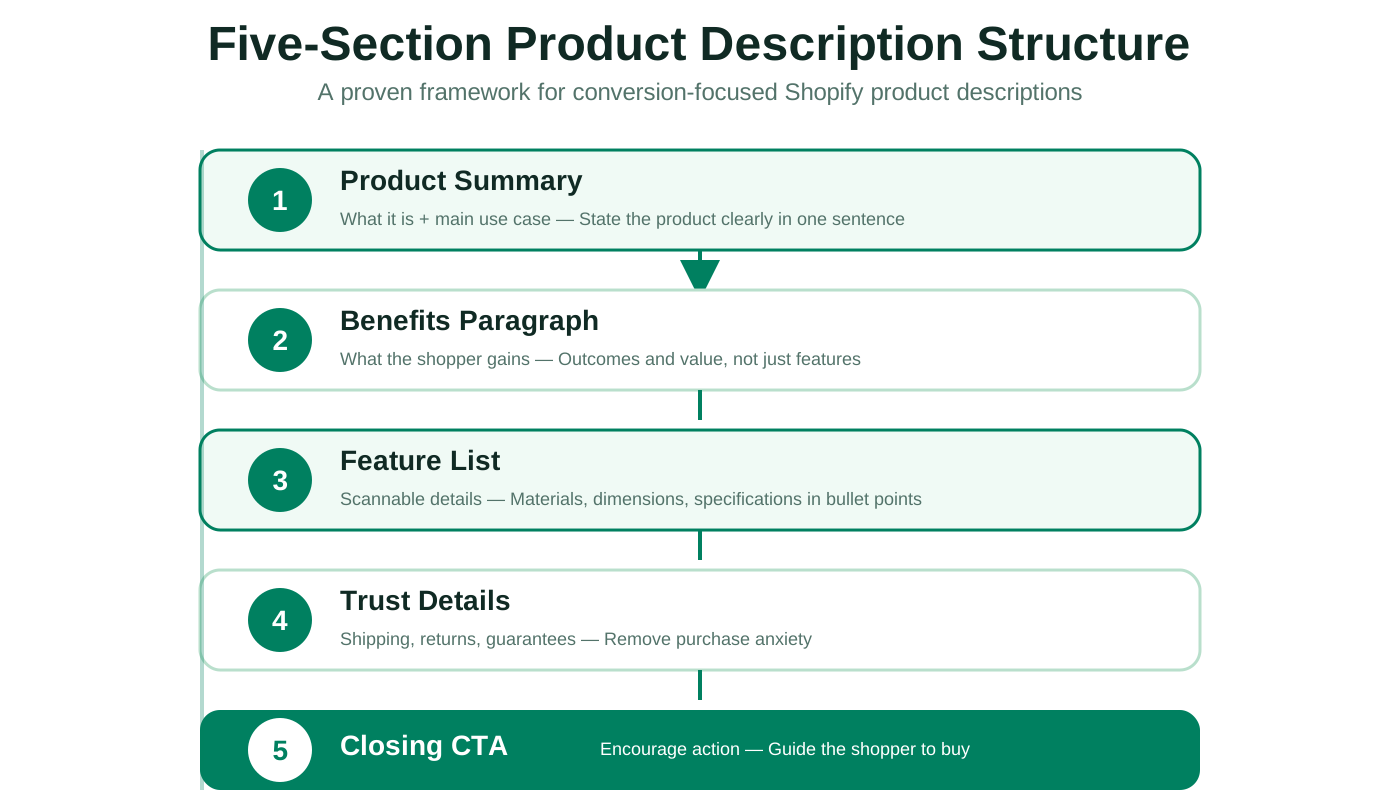
Effective description structure:
- • Opening sentence: State what the product is and its main use case
- • Benefits paragraph: Explain what the shopper gains from using the product
- • Feature list: Provide scannable details like materials, dimensions, and specifications
- • Trust details: Add information about shipping, returns, or guarantees
- • Closing CTA: Encourage the shopper to take action
According to Shopify's guidance, product descriptions should include size, material, suggested uses, benefits, and engaging details. This aligns with both buyer needs and search engine clarity. For more on crafting effective descriptions, see our Shopify Product Description Template Guide.
5. Social Proof and Reviews
Reviews are among the most powerful conversion tools on a product page. They provide third-party validation that reduces purchase anxiety. Studies consistently show that shoppers trust peer reviews more than brand marketing.
- • Display review scores prominently near the product title
- • Show review count to indicate volume of feedback
- • Include both positive and critical reviews for authenticity
- • Highlight reviews that mention specific product benefits
- • Add user-generated photos when available
Search engines also value user-generated content. Reviews add fresh, relevant text to product pages, which can improve search visibility.
6. Add to Cart Button
Your Add to Cart button should be impossible to miss. It is the primary action point on the page, so treat it accordingly.
- • Use high-contrast colors that stand out from the background
- • Make the button large enough to tap easily on mobile
- • Place the button above the fold and repeat it lower on the page
- • Use clear language like "Add to Cart" or "Buy Now"
- • Avoid vague phrases like "Submit" or "Continue"
The button should also change state visually when hovered or tapped, providing immediate feedback to the shopper.
Layout and Visual Hierarchy
How you arrange elements on the page matters as much as what those elements contain. Visual hierarchy guides the shopper's eye through the information in a logical sequence.
Mobile-First Layout
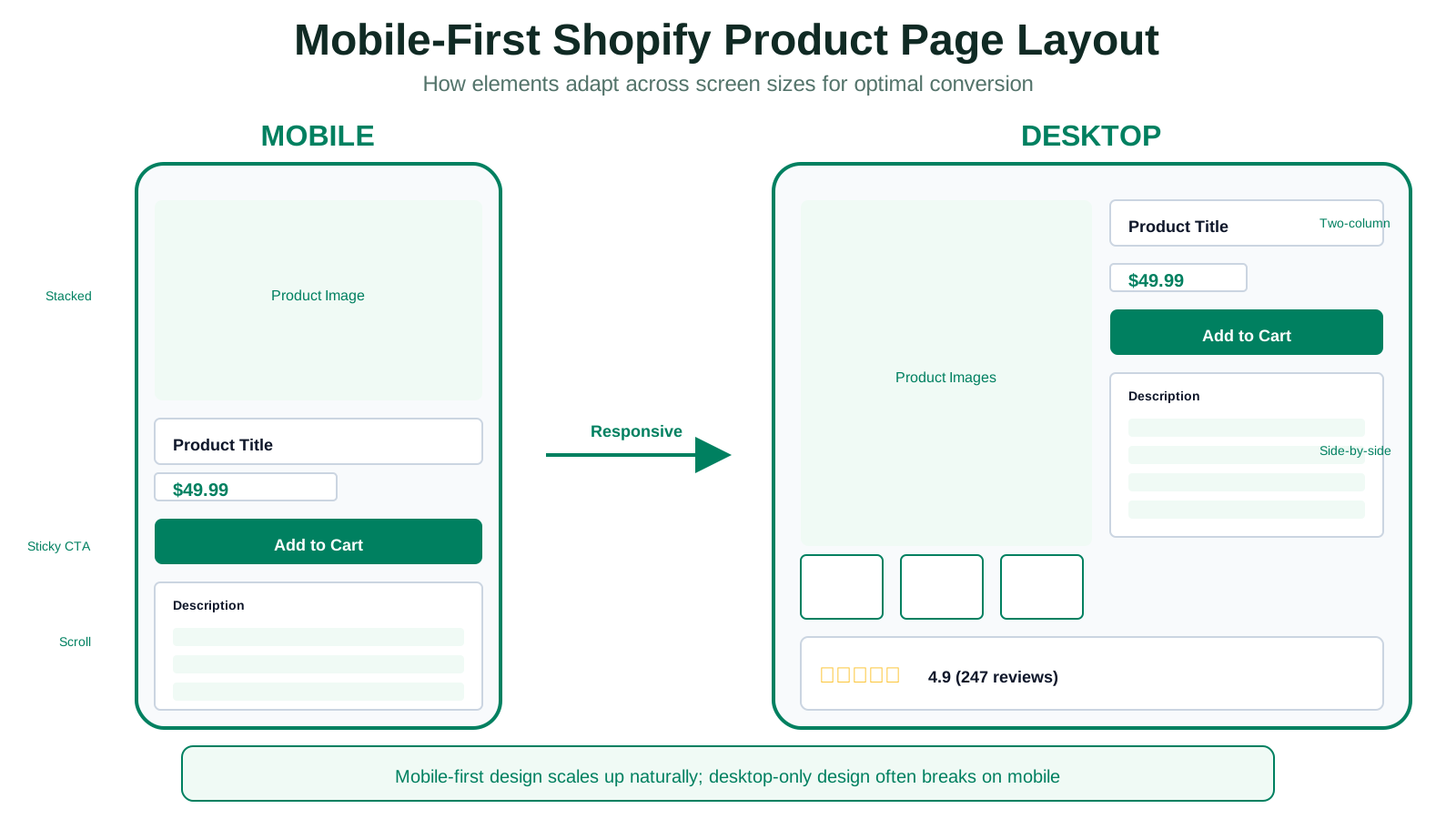
With mobile commerce accounting for the majority of online shopping, design for mobile first. A mobile-friendly layout automatically scales up for desktop, but the reverse is not always true.
- • Stack elements vertically for easy scrolling
- • Place primary images at the top
- • Keep the Add to Cart button visible as the user scrolls (sticky position)
- • Use large touch targets for buttons and links
- • Minimize popups and overlays that interrupt the experience
Test your product pages on actual mobile devices. Emulators miss real-world issues like touch accuracy and loading speed on cellular networks.
Above the Fold Priorities
The content visible without scrolling, known as above the fold, should immediately communicate:
- • What the product is (title and image)
- • How much it costs (price)
- • Whether it is available (stock status)
- • How to buy it (Add to Cart button)
Secondary content like detailed specifications, reviews, and related products can appear below the fold. The top of the page answers the question "Is this what I am looking for?" The rest of the page answers "Should I buy it?"
Shopify Product Page SEO Best Practices
Product pages compete for visibility in search results. SEO optimization helps your pages rank for relevant queries, bringing in organic traffic from shoppers actively searching for products like yours.
Keyword Strategy
Each product page should target specific, relevant keywords. Focus on terms that reflect what shoppers actually search for when looking for your product.
Keyword placement priorities:
- • Product title (primary keyword)
- • Meta title and description
- • Opening sentence of the description
- • Image alt text
- • URL slug
Avoid keyword stuffing. Write naturally while ensuring relevant terms appear where they matter most. For a comprehensive approach to search optimization, see our Shopify SEO Guide.
Structured Data (Schema Markup)
Schema markup helps search engines understand your product data. This can enable rich snippets in search results, showing price, availability, and review stars directly in the listing.
Essential schema properties for products:
- • Product name
- • Price and currency
- • Availability status
- • Brand
- • Image
- • Description
- • Aggregate rating and review count
Shopify themes often include basic schema support. Verify that your pages render proper structured data using Google's Rich Results Test.
Page Speed Optimization
Page speed affects both rankings and conversions. A slow product page frustrates shoppers and signals poor quality to search engines.
- • Compress images without quality loss
- • Use lazy loading for images below the fold
- • Minimize third-party scripts and apps
- • Choose a fast, mobile-optimized theme
- • Enable browser caching
Google's PageSpeed Insights provides specific recommendations for improving load times. Aim for scores above 90 on both mobile and desktop.
Common Shopify Product Page Mistakes
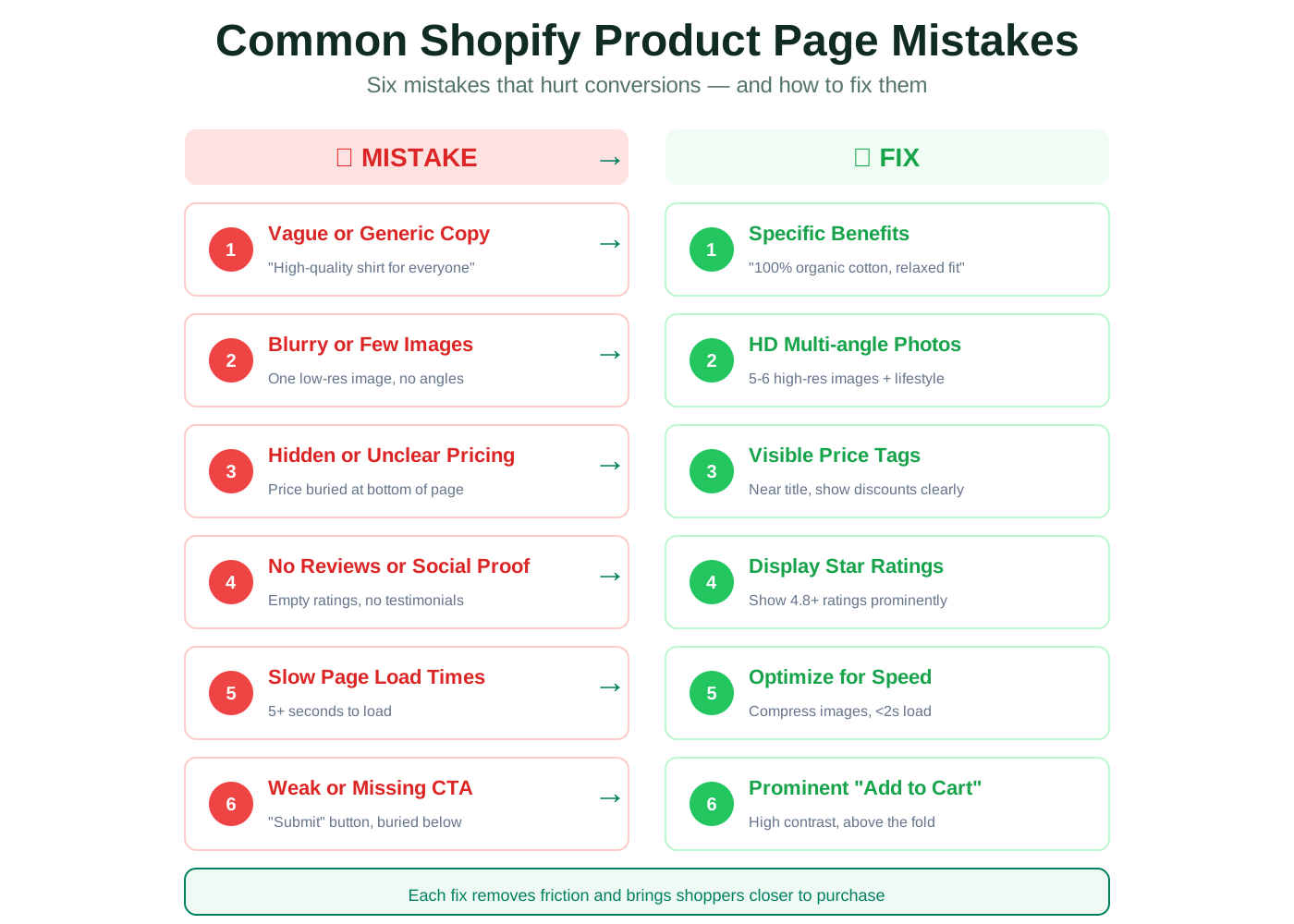
Understanding what goes wrong is as important as knowing what goes right. These mistakes frequently undermine product page performance.
Vague or Generic Copy
Generic descriptions fail to differentiate your product. If your copy could describe any similar product, it is not doing its job.
Fix: Write descriptions that mention specific benefits, use cases, and product attributes. Address the questions your customers actually ask.
Poor Image Quality or Insufficient Images
Blurry images, missing angles, or lack of context prevent shoppers from evaluating the product. In categories like apparel, home goods, or beauty, visual detail drives purchase confidence.
Fix: Include 5+ high-quality images per product. Add lifestyle shots that show the product in real use. Provide zoom or 360-degree views when possible.
Hidden or Confusing Pricing
Shoppers who cannot find clear pricing information may assume the product is overpriced or that hidden costs exist. This creates distrust.
Fix: Display price prominently near the product title. Show any discounts clearly with original prices crossed out. Include shipping costs or indicate "Free shipping" when applicable.
Missing Social Proof
A product page without reviews or testimonials lacks credibility. Shoppers wonder whether the product delivers on its promises.
Fix: Encourage reviews through follow-up emails. Display ratings prominently. Highlight detailed reviews that mention specific benefits.
Slow Page Load Times
Every second of delay reduces conversions. Slow pages also rank lower in search results, compounding the problem.
Fix: Audit images, scripts, and third-party apps. Compress assets and remove unnecessary code. Test on mobile networks, not just desktop.
Weak or Missing Call to Action
A product page that fails to guide the shopper toward purchase leaves money on the table. Vague buttons or missing CTAs create hesitation.
Fix: Use prominent, clear Add to Cart buttons. Place them above the fold and repeat them lower on the page. Use action-oriented language.
Frequently Asked Questions
What are the most important elements of a Shopify product page?+
The most important elements are clear product images, a descriptive title, visible pricing, benefit-led description, social proof like reviews, and a prominent Add to Cart button. Each element addresses a specific shopper question and removes a potential barrier to purchase.
How many images should a Shopify product page have?+
High-converting product pages typically include 5 to 6 images: front view, back view, close-up detail, scale reference, lifestyle shot, and packaging when relevant. More images can help for complex products, but quality matters more than quantity.
How long should a Shopify product description be?+
A product description should be long enough to answer shopper questions and short enough to scan easily. Many successful descriptions fall between 150 and 300 words, with bullet points for specifications. Longer descriptions work when the product requires detailed explanation.
Where should I place the Add to Cart button?+
Place the Add to Cart button above the fold so shoppers can buy without scrolling. On mobile, use a sticky button that remains visible as the user scrolls. Repeat the button lower on the page for shoppers who read the full description.
How do reviews affect product page conversions?+
Reviews provide social proof that reduces purchase anxiety. Shoppers trust peer feedback more than brand marketing. Displaying ratings near the product title and detailed reviews lower on the page can significantly increase conversion rates.
What is the best layout for mobile product pages?+
Mobile product pages should stack elements vertically for easy scrolling. Lead with the primary product image, followed by title, price, and Add to Cart button. Keep text concise and use large touch targets for all interactive elements.
How can I improve my Shopify product page SEO?+
Optimize product titles and descriptions with relevant keywords. Write unique meta descriptions for each page. Add descriptive alt text to all images. Implement structured data for products. Ensure fast page load speeds. Link internally to related products and collections.
Should I show out-of-stock products on my Shopify store?+
If a product will return, keep the page live with clear "Out of Stock" messaging. This preserves SEO value and allows you to capture email addresses for restock notifications. If a product is discontinued, redirect the URL to a relevant alternative.
Start Optimizing Your Product Pages Today
A strong Shopify product page does not happen by accident. It results from deliberate choices about what to include, how to arrange it, and what to avoid. Use this guide as a checklist to audit your existing pages and improve each element systematically.
Start with the basics: clear images, descriptive copy, visible pricing, and a prominent Add to Cart button. Then layer in social proof, mobile optimization, and SEO refinement. Small improvements compound over time, turning more of your traffic into actual sales.
Start Optimizing Product Pages NowRelated Resources
Shopify SEO Guide →
Build a stronger search foundation for your store.
Shopify Product Description Template →
Turn structured product details into conversion-ready copy.
Shopify Meta Fields Guide →
Extend your product data with custom fields.
AI Product Descriptions Guide →
Learn how AI can support your ecommerce content workflow.