What is an Etsy Listing Description?
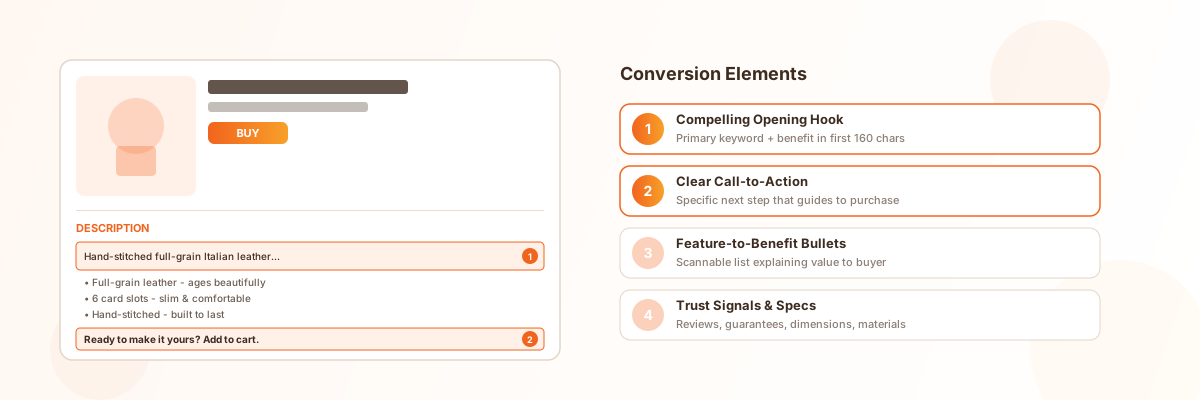
An Etsy listing description is the text field on your product listing that tells shoppers what they’re buying. It sits below your photos and price, and it can contain up to 1,000 characters on the Etsy app and even more on desktop. Unlike your title — which is built for search algorithms — the description is built for humans. It’s where you explain materials, dimensions, personalization options, care instructions, shipping timelines, and anything else a buyer needs to know before purchasing.
Think of the description as your in-store salesperson. When a customer picks up a product in a physical shop, a good salesperson highlights the key features, answers questions, and gently guides them toward a purchase. Your listing description does the same thing, except it needs to work 24/7 without you there. Every sentence should serve a purpose: either helping the shopper understand the product, building trust, or moving them closer to checkout.
Etsy gives you flexibility in how you format descriptions. You can use line breaks and bullet points to create structure. The most effective descriptions are scannable — shoppers rarely read every word, so breaking information into digestible sections helps them find what they need quickly.
Why Etsy Listing Descriptions Matter
Impact on Etsy Search Ranking
While Etsy’s search algorithm weighs titles and tags more heavily than descriptions, the description still plays a meaningful role in SEO. Etsy indexes the text in your description for query matching — if a shopper searches for a phrase that appears in your description but not your title or tags, your listing can still appear in results. This makes the description a valuable space for incorporating long-tail keywords and synonyms that don’t fit naturally in your title’s 140-character limit.
More importantly, descriptions indirectly influence your listing quality score. Etsy’s algorithm tracks how shoppers interact with your listing after clicking. If they read the description, favorite the item, and proceed to purchase, Etsy interprets this as a high-quality listing and boosts its ranking. A description that fails to answer key questions causes shoppers to bounce back to search results, which signals low relevance and pushes your listing down.
Impact on Purchase Decisions
The description is where conversion happens. Research from Etsy’s own Seller Handbook indicates that listings with detailed, well-structured descriptions convert at higher rates than those with minimal text. Shoppers who read a description that anticipates their questions, highlights benefits beyond what photos show, and creates confidence in the product are significantly more likely to purchase.
Consider what happens when a description is vague or incomplete. A shopper interested in a handmade necklace sees beautiful photos but can’t find the chain length, clasp type, or whether it’s hypoallergenic. They might send a message — but many won’t. They’ll simply move on to a competitor whose description answers those questions upfront. Every unanswered question in your description is a potential lost sale.
How ImageChat Helps Generate Quality Descriptions
Writing compelling descriptions for dozens of listings is time-consuming. Image Chat streamlines this by generating keyword-aware, benefit-focused descriptions from your product images and basic details. Upload a photo, enter key specs, and Image Chat produces a structured description with SEO keywords and persuasive copy — all in your shop’s consistent voice. For sellers managing large catalogs, this means every listing gets a quality description without hours of manual writing.
How to Write an Etsy Listing Description
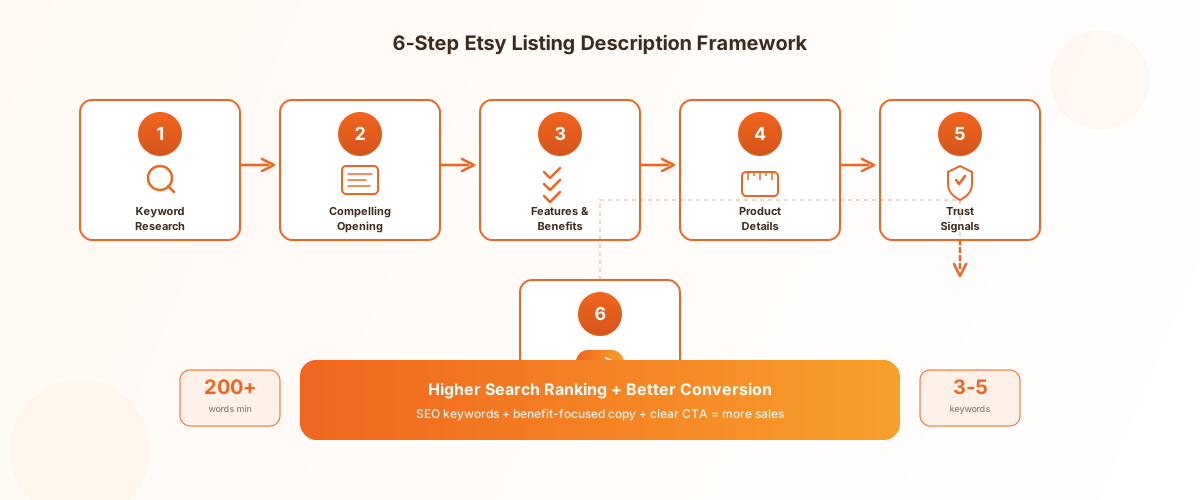
Step 1: Research Your Keywords
Before writing a single sentence, identify the keywords your target buyers are searching for. Start with Etsy’s search bar auto-complete — type your product type and note the suggested completions. These reflect real shopper searches. Check your Etsy Shop Stats to see which search terms already bring traffic to your listings. Tools like eRank and Marmalead provide keyword volume and competition data specific to Etsy.
Select 3-5 keywords to weave into your description naturally:
- • One primary keyword (matching your title)
- • Two to three secondary keywords (synonyms and related terms)
- • One to two long-tail keywords (specific phrases with lower competition)
For example, if you’re selling a personalized leather wallet, your keywords might include “personalized leather wallet” (primary), “custom engraved wallet” and “mens leather bifold” (secondary), and “personalized gift for dad leather wallet” (long-tail). These should appear naturally in your description, not stuffed awkwardly into sentences.
For a deeper dive on keyword strategy, see our Etsy SEO Tips guide.
Step 2: Write a Compelling Opening
The first 160 characters of your description are critical. This text may appear in search previews and social media shares, so it needs to hook the reader immediately. Lead with your primary keyword and a benefit-focused statement that makes shoppers want to read more.
Good opening example:
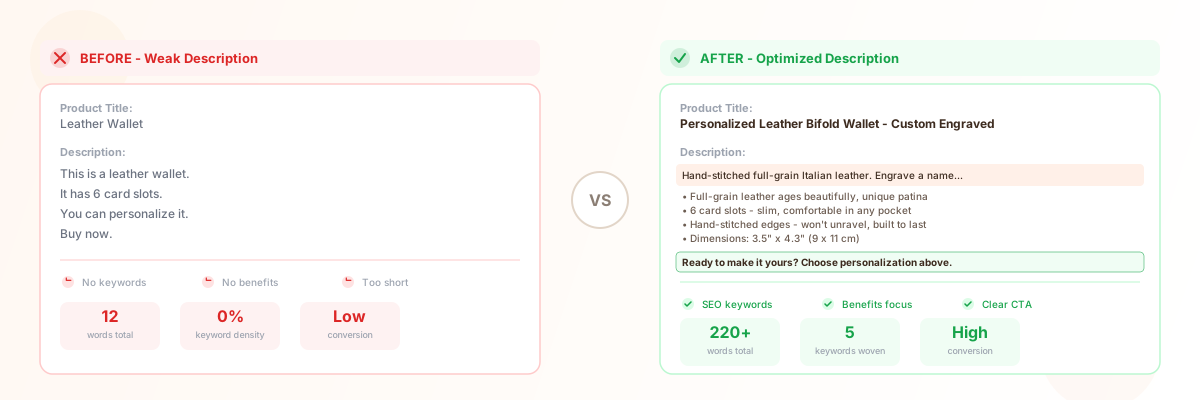
“Hand-stitched from full-grain Italian leather, this personalized bifold wallet combines heirloom craftsmanship with everyday functionality. Engrave a name, initials, or meaningful date to create a one-of-a-kind gift.”
Weak opening example:
“This is a leather wallet. It has 6 card slots. You can personalize it.”
The difference is clear. The first leads with craftsmanship and emotional appeal. The second reads like a spec sheet and gives shoppers no reason to keep reading. For more etsy description examples, study top-ranking listings in your category — note how they structure their opening lines.
Step 3: Highlight Key Features and Benefits
This is the core of your description. Move beyond listing features — explain how each feature benefits the buyer. A feature is what the product is; a benefit is what it does for the customer.
Feature-to-benefit framework:
Feature:Full-grain Italian leather → Benefit: Ages beautifully, developing a unique patina that tells your story over decades
Feature:6 card slots → Benefit: Holds all your essential cards without bulking up, keeping your wallet slim and comfortable in any pocket
Feature:Hand-stitched edges → Benefit:Won’t unravel like machine-stitched wallets, ensuring your wallet lasts for years
Format this section as a bulleted list for easy scanning. Most shoppers skim descriptions rather than reading word-for-word, so bullet points help them absorb key information quickly.
Step 4: Include Product Details and Specs
After the benefit-focused section, provide the practical details shoppers need to make an informed decision. Be specific and use measurements — vague descriptions erode trust.
Essential details to include:
- • Dimensions (in both inches and centimeters for international buyers)
- • Materials (exact types — “full-grain vegetable-tanned leather” beats “leather”)
- • Weight
- • Color options (if applicable)
- • Personalization options and how to request them
- • Care instructions
- • What’s included in the order
For personalization, be explicit about the process. Tell buyers exactly where to enter their customization details — “Add your personalization text in the ‘Add your personalization’ box at checkout” — to reduce confusion and abandoned carts.
Step 5: Add Social Proof and Trust Signals
Trust is the bridge between interest and purchase. Since Etsy shoppers can’t hold your product before buying, your description needs to build confidence through other means.
Trust elements to include:
- • Mention how many items you’ve sold or how long you’ve been crafting
- • Reference your review rating naturally: “Join 2,000+ happy customers who’ve gifted this wallet”
- • Highlight your return policy briefly: “Not quite right? Returns accepted within 30 days”
- • Note your processing and shipping times clearly
- • Mention any guarantees or warranties
Don’t fabricate numbers — if you’re a new shop, focus on the quality of your materials and craftsmanship instead. Authenticity matters more than impressive statistics.
Step 6: End with a Clear CTA
Every description should end with a clear call-to-action that tells the shopper what to do next. Don’t leave them hanging after reading your product details — guide them toward the purchase decision.
CTA examples:
- • “Ready to make it yours? Choose your personalization options above and add to cart.”
- • “Have questions about customization? Send me a message — I respond within 24 hours.”
- • “Limited stock available this month. Add to cart to secure yours.”
The key is specificity. “Buy now” is too generic. A CTA that references the next concrete action — choosing personalization, sending a message, or securing limited stock — feels more natural and actionable.
Using ImageChat to Generate Descriptions
Instead of writing each description from scratch, use Image Chat to accelerate the process. Upload your product photo, enter basic specs, and Image Chat generates a complete description following the six-step framework. You get SEO keywords woven in naturally, benefit-focused bullet points, and a structured format ready to paste into your Etsy listing. For large catalogs, Image Chat can generate consistent descriptions across all listings in minutes.
Learn more in our product description template guide.
Etsy Listing Description Best Practices
These etsy listing tips apply across every product category and skill level:
Write for Scannability
Shoppers don’t read descriptions — they scan them. Structure your description so key information is easy to find at a glance. Use short paragraphs (2-3 sentences max), bullet points for features and specs, and line breaks to create visual separation between sections. Consider using simple text headers or emoji markers to delineate sections within the description field, since Etsy doesn’t support rich text formatting.
Match Your Description to Your Photos
Your description and photos should work as a team. If your primary photo shows the product in a lifestyle setting, use the description to explain the practical details the photo can’t convey — dimensions, materials, how it feels in hand. If your photos are studio shots on white backgrounds, use the description to paint the lifestyle picture: how the product looks in use, what occasions it’s perfect for, who would love receiving it as a gift.
Keep Descriptions Consistent Across Your Shop
Consistency builds trust. Use the same structure — opening hook, features and benefits, specs, personalization instructions, trust signals, CTA — across all your listings. This doesn’t mean writing identical copy. It means shoppers who browse multiple listings in your shop know where to find the information they need. A predictable structure reduces cognitive load and makes shopping your store feel professional and reliable.
Update Descriptions Based on Customer Questions
Every message you receive from a buyer is feedback on your description. If multiple shoppers ask about chain length, your description doesn’t mention it clearly enough. If people frequently ask about gift wrapping, add that information proactively. Review your customer messages monthly and use them to identify gaps in your descriptions. This iterative approach keeps your descriptions improving over time.
Use Description Templates
Create an etsy description template for each product category in your shop. A template ensures you don’t forget essential sections and speeds up listing. Your template might look like:
- Opening hook with primary keyword (2-3 sentences)
- Features and benefits (bullet list, 4-6 items)
- Product specifications (dimensions, materials, weight)
- Personalization instructions (if applicable)
- Care instructions
- Shipping and processing timeline
- Trust signals
- CTA
Fill in the template with product-specific details for each new listing. This maintains quality and consistency while keeping listing creation efficient.
Common Etsy Listing Description Mistakes
1. Writing Too Little
A one-sentence description tells shoppers you don’t care enough to explain your product. It also misses valuable keyword real estate for Etsy search. Aim for at least 200 words. If you’re selling a complex or personalized product, 300-500 words is appropriate. Every sentence should add value — don’t pad with filler, but don’t leave buyers guessing either.
2. Keyword Stuffing
Cramming keywords into your description makes it unreadable and can hurt your listing quality. “Leather wallet mens wallet personalized wallet custom engraved bifold wallet” is not a sentence — it’s keyword spam. Write naturally for humans first. Your keywords should fit seamlessly into sentences that actually communicate something useful.
3. Copy-Pasting Across Listings
Using the same description for every listing in your shop is a red flag for both shoppers and Etsy’s algorithm. Each product is unique, and your description should reflect that. Even if you sell variations of the same product (e.g., different colors of the same necklace), tailor each description to highlight what makes that specific variation special.
4. Forgetting Personalization Instructions
If your listing offers personalization, the description must explain exactly how buyers should submit their customization details. Many shoppers don’t know where to enter personalization text, and if they can’t figure it out, they’ll abandon the purchase. State clearly: “To personalize, enter your text in the personalization box before clicking ‘Add to Cart.’” Include character limits and formatting examples if applicable.
5. Ignoring Mobile Shoppers
Over 50% of Etsy traffic comes from mobile devices. Long, unbroken paragraphs look terrible on a phone screen and cause shoppers to scroll past key information. Keep paragraphs short, use line breaks generously, and put the most important information early in the description — mobile shoppers may not scroll to the bottom.
Frequently Asked Questions
How long should an Etsy listing description be?
Aim for 200-500 words depending on product complexity. Simple products need at least 200 words; personalized or complex products benefit from 300-500 words. Avoid descriptions under 100 words — they miss keyword opportunities and fail to answer buyer questions. Prioritize quality over quantity. Every sentence should serve the buyer.
Do Etsy descriptions affect search ranking?
Yes, though less directly than titles and tags. Etsy indexes description text for query matching — keywords in your description can help your listing appear in additional searches. More importantly, descriptions affect your listing quality score indirectly: a good description improves conversion rates, and higher conversion signals to Etsy that your listing deserves better ranking.
What should I include in my Etsy product description?
Include an opening hook with your primary keyword, a features-and-benefits section (bullet points), product specifications (dimensions, materials, weight), personalization instructions if applicable, care instructions, shipping and processing timeline, trust signals (reviews, guarantees), and a clear call-to-action. Structure these sections consistently across all your listings for a professional shop appearance.
Can I use the same description for similar listings?
No. Each listing should have a unique description tailored to that specific product. Even color variations of the same item should have descriptions that highlight what makes that variation distinct. Copy-pasting descriptions across listings can confuse shoppers, dilute your keyword targeting, and signal low effort to Etsy’s algorithm.
How do I add keywords to my Etsy description?
Research keywords using Etsy search auto-complete, Shop Stats, and tools like eRank. Select 3-5 keywords and weave them naturally into your description text. Place your primary keyword in the first 160 characters. Use secondary keywords in feature descriptions and product specs. Never force keywords into sentences where they don’t fit — write for readability first.
Should I mention shipping in my description?
Yes. Clearly state your processing time and estimated delivery timeframe. This reduces buyer anxiety and prevents disputes. Mention whether you offer expedited, international, or free shipping. If shipping varies by location, note that buyers should check details at checkout for accurate estimates.
How often should I update my Etsy descriptions?
Review descriptions monthly using Shop Stats and customer messages as guides. If a listing has low conversion rates, revise the description to address buyer concerns. If you receive repeated questions about the same detail, add that information proactively. Update seasonal descriptions 4-6 weeks before peak periods.
Can ImageChat write Etsy descriptions for me?
Yes. Image Chat generates complete Etsy listing descriptions from your product photos and basic specs. Upload an image, enter key details, and Image Chat produces a structured description with SEO keywords, benefit-focused copy, and a clear CTA. This is especially useful for sellers with large catalogs.
Start Generating Your Etsy Descriptions Now
A great Etsy listing description does more than fill a text field — it turns browsers into buyers. Apply the six-step framework, weave in your keywords, and watch how a well-crafted description changes your conversion rate.
Start Generating Your Etsy Descriptions NowRelated Resources
- Etsy SEO Tips — Complete guide to ranking higher in Etsy search
- Etsy Tags Optimization Guide — Master Etsy tags for better search visibility
- Shopify Product Description Template — Reusable templates for any product type
- Shopify Product Page Best Practices — Optimize every element of your product pages
- Amazon Title Optimization Guide — Write product titles that rank and convert